🤖 Eleven onboarding flows — review board

Every way someone arrives in Eleven, step by step. Built from main @ 7312ce3a (with #1554, #1555 and #1556) on 2026-10-03, for review and discussion. The copy is quoted from source and each step cites its file. The screenshots come from a throwaway local build. Fake sign-in doors were enabled for the capture, so no real ceremony was completed. Click any screenshot to see it full size.

Summary

Best-case count from tapping the link to the first chat surface. "Screens" counts distinct cards or screens before the chat. "Taps" excludes the identity provider’s own sheet and biometric prompts, which are listed separately. Eleven’s conversation after landing is counted on its own.

Flow / pathSurfaceScreens before chatTapsPlusThen in Eleven’s conversation
1 · Invite, sign-in-first (new person, Apple)Web · iPhone Safari43Apple sheet + biometrics ×2 (sign-in, key step)name chip, photo skip, “Done for now” = 3
1 · Invite, sign-in-first (new person, Apple)Web · desktop32Apple sheet + biometrics ×23
1 · Invite, “…” → without signing inWeb · iPhone Safari34—access “Not now”, name, photo, done = 4
1 · Invite, classic card (self-host / old home)Web · iPhone Safari22—4
3 · Invite opened in the app, signed out (iOS 18+)iPhone21Safari “Open in Eleven?” + Apple sheettype a name (no suggested-name chip natively), done = 2
3 · Invite opened in the app, already signed iniPhone11—2
4 · Invite via universal link, signed inMac11—2
4 · Spaces › Add from link… (paste)Mac13menu, paste, Add Space2
5 · Create a space (signed in, has a space, under quota)Web · home44slide-to-create gestureabout 10 answers: name, space name, email, photo, invites, extras, AI, plan*, key, finish
5 · Create a space (over the free quota or pool full)Web · home76+Stripe Checkout form before the space existsabout 10
5 · Create a spaceiPhone / Mac22slide gestureabout 6: name auto-recorded, no photo, plan or key step
6 · New browser, returning memberWeb · home2–32provider sheet + passkey for “Unlock”—

* The plan step only appears on web, for a free space, when the home server serves a price book (web/static/apps/setup.js:139-158).

built (on main) in flight (open PR) planned / designed, not built screenshot real capture from a local build mock hand-drawn HTML that mirrors the real copy and styles

Top observations

  1. Creating a space is not pay-gated up front. It is gated by having an invite, and paid for when over quota. The home page only offers “+” once your account already holds a space. Otherwise it shows “None (yet). Creating is invite-only for now.” (home.js:2792, 2833, enforced in home/provision.go:248-263). The first free create goes straight through. The second one, or any create while the free pool is full, bounces to a plan picker and then Stripe Checkout before the space exists (home.js:3881-3888, cloud.go:325-333, default LCHAT_CLOUD_QUOTA=1). Setup already has a web-only plan step that defers payment (“payment waits at the finish line”, then a “Set up your plan” chip at the finish). So “move payment to the end” is partly built. What’s left: replace the over-quota bounce, move the plan step after the key step, and give native the same step. See flow 5.
  2. Sign-in gets asked for twice. If someone signs in at home but taps “Not now” on the key step, or the key step is skipped (no PRF or WebAuthn), Eleven’s first real question is “Sign in with Eleven and your access is safe…”, a minute after they signed in. On a new browser, a sealed returning member gets Apple sign-in and then a separate passkey “Unlock”.
  3. Creators are told to “join”. A setup link from outside home lands on “Continue to <host>” and “Sign in to join. You’ll head straight back to <host>.” That’s the wrong verb, there’s no space name yet, and the host is a sqid (for example cnz.11ch.at). Every join card’s sub-line names the raw host instead of the space.
  4. The iPhone add-to-Home-Screen card gives a dead instruction. It shows after a sign-in-first join and says “Open The Commons from your Home Screen, then paste your invite link to join”, but the invite has already been used (screenshot 1.7).
  5. The same card says different things on each surface.
    • Title: “Join The Commons” on web, “Add this space?” on iPhone, “Add a space from a link” on Mac.
    • The warning’s buttons are in the opposite order on Mac.
    • Both native apps use title case for “Add Space”.
    • The Mac has a cluster of title-case labels (“Sign In with Eleven…”, “Link from Your iPhone…”, “Ask for a New Invite…”, “Unlock with Your Passkey…”).
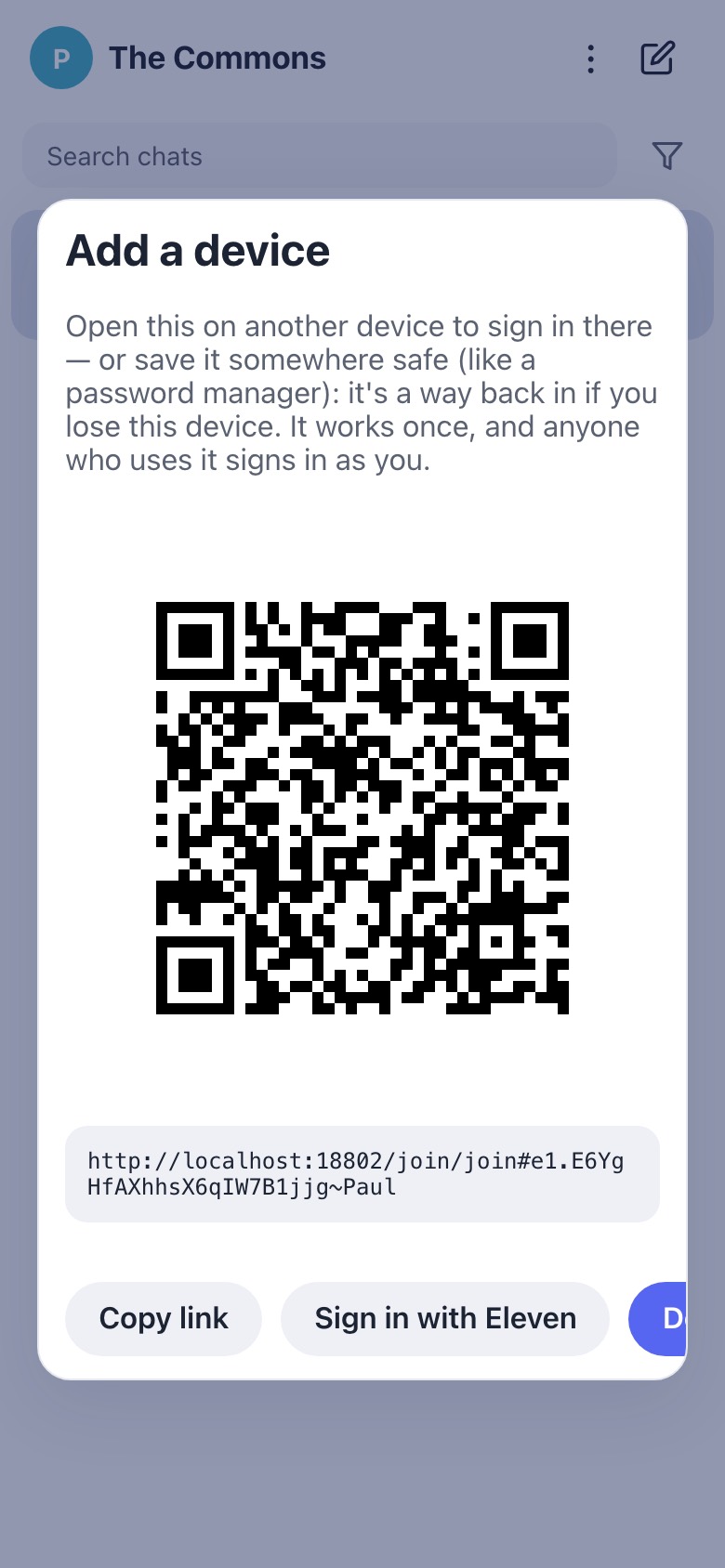
  6. The “Add a device” sheet’s buttons overflow on a phone. At 390px wide the “Done” button is clipped off the right edge (screenshot 7.2), and a failure uses a floating alert().
  7. “Continue with GitHub” always shows under Other ways to sign in, even when the home has no GitHub door configured. The local capture had no GitHub env set and it still rendered (home/web/pages/index.html:929).
  8. The order words in the conversations fight each other, and the key is buried. The welcome says “Before anything else” and then “First things first”. Setup goes “Nearly there.” → “Last choice — AI.” → “One more question” → “Now the most important thing of all.” The key step, which the copy itself calls the most important, comes ninth. Until then the space’s only key lives in one browser.
  9. Native has quiet gaps.
    • The photo and plan steps are skipped natively without being recorded, so web asks again later.
    • The native setup quick form turns AI on by default (web is opt-in) and then the flow asks the AI question again.
    • A natively created space is marked setup_complete when it’s claimed, so web never resumes its setup.
    • A native quota refusal says “upgrade” but offers no way to do it.
  10. The sealed home is a dead end without a passkey. The only control is “Unlock your spaces with your passkey”, with no explanation and no alternative. When it fails, the explainer is attached to a hidden element. #1557 (device-held key) and #1559 (approve from a device) address this and are drawn below as in flight.
  11. The join card contradicts itself. “Sign in to join.” sits directly above “No signup required, we don’t store your email…”.
  12. The link-error card has the wrong heading for network failures. “Couldn’t reach the server. Try again.” appears under the heading “This link doesn’t work”. And “This invite was just used.” appears after someone has finished signing in, with no way forward.

1 · Web invite → join (sign-in-first, #1555)

The invite link (/join/join#e1.<T>~<name>) opens on the space’s own origin. If a home server answers join_return ≥ 2 within 3 seconds, the space hands straight over to home with no card. Home parks the return address and strips the hash, so only home.elevenmessenger.com/ shows in the address bar. After sign-in, home returns to <space>/join/join?su=<nonce>[&key=1 | &anon=1], which claims the invite without showing a card.

Happy path: sign in with the leading door
thecommons.11ch.at/join/join#e1.…~Sam
MOCK

(spinner — aria-label “Loading”)

1.0mock

Invite link opens on the space

Only a spinner shows while the page calls GET <home>/api/features (3-second timeout). The link preview says “You're invited to The Commons” / “Private, end-to-end encrypted chat.”

web/pages/join.html:14-19, 71 · web/static/join.js:471-476 · prejoin.js:31-35

home.elevenmessenger.com
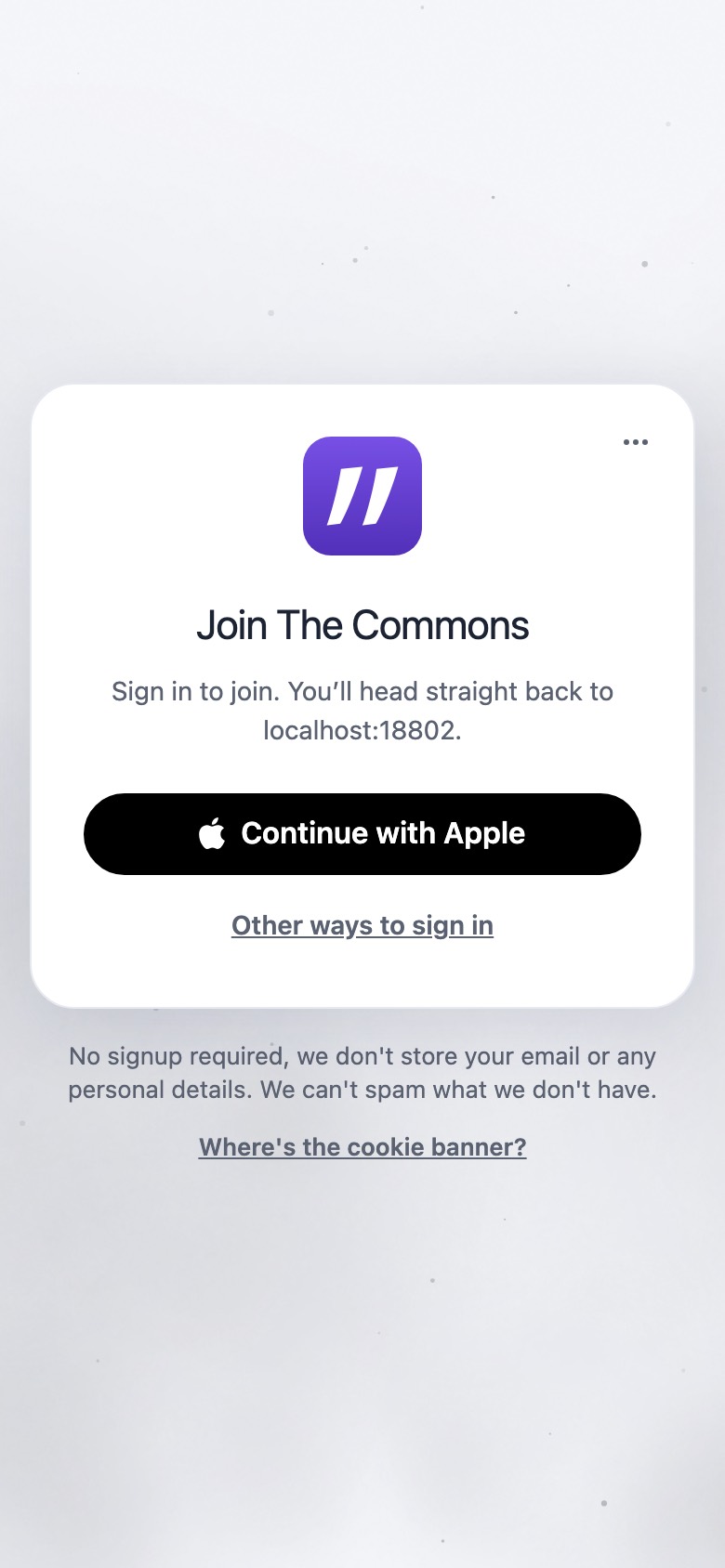
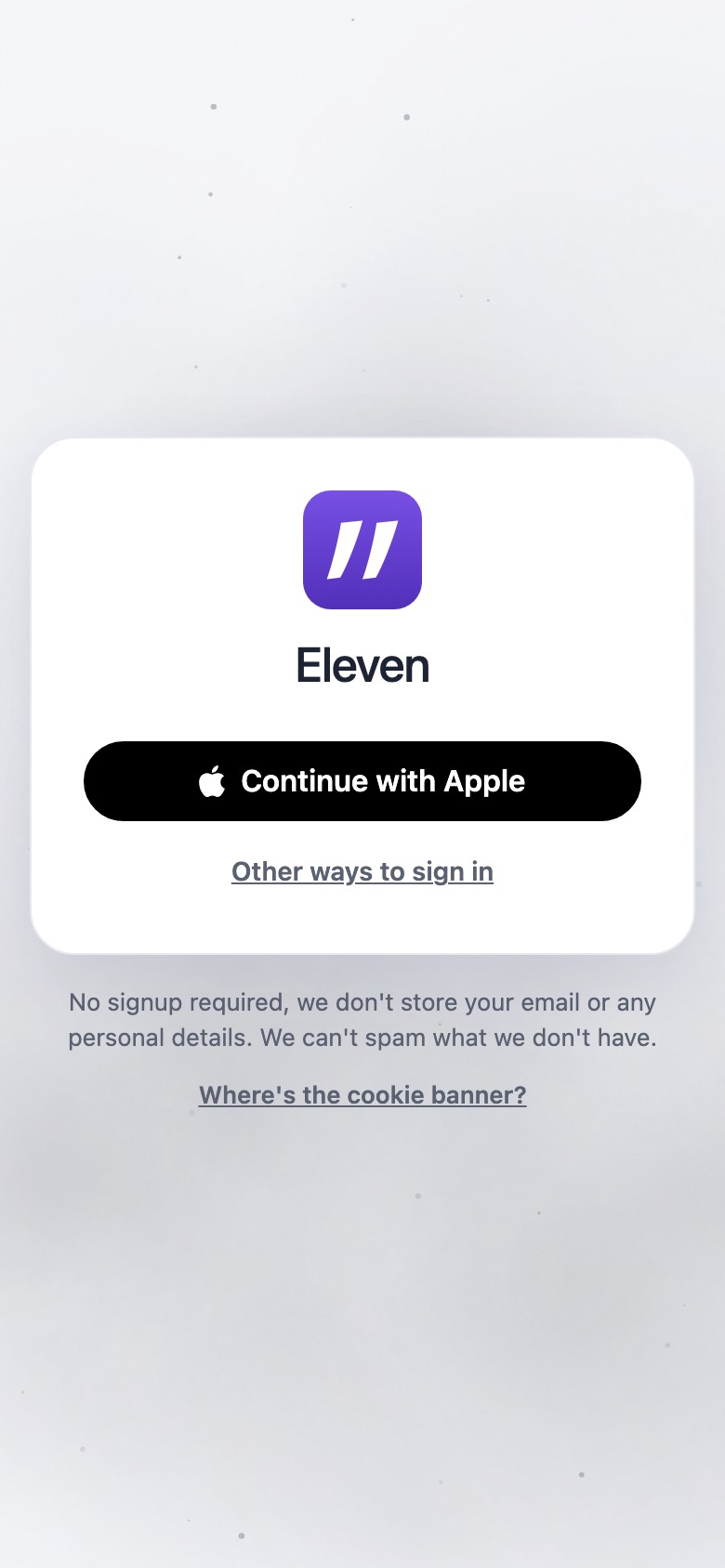
Home join card: Join The Commons, Continue with Apple, Other ways to sign in
1.1screenshot

Home “Join <space>” card: one door

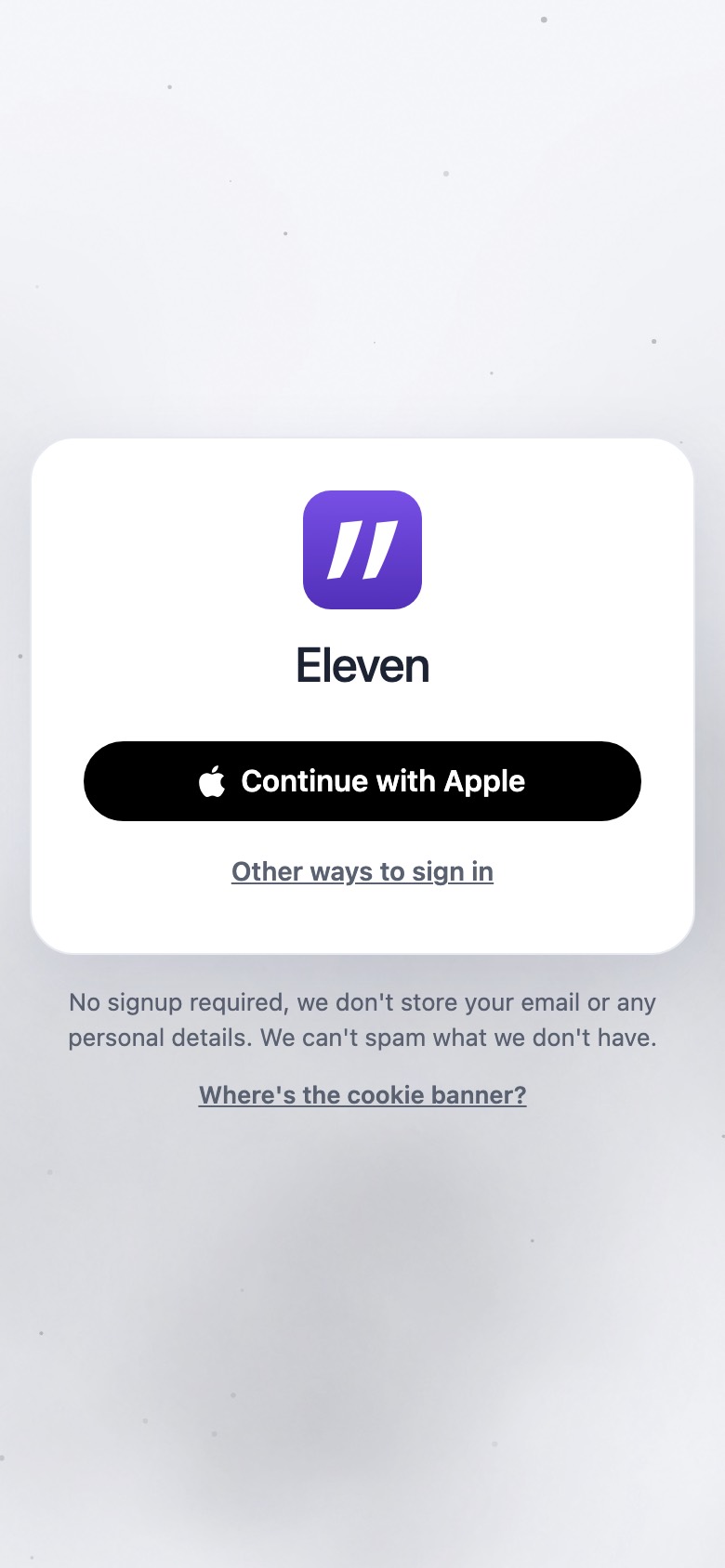
The door shown is the last-used method. Otherwise it’s the platform default: Apple on Apple devices, Google on Android/ChromeOS, Microsoft on Windows, else email.

Join The Commons

Sign in to join. You’ll head straight back to localhost:18802.

Under the card: No signup required, we don't store your email or any personal details. We can't spam what we don't have.

Continue with AppleOther ways to sign in… (aria “More ways to join”)Where's the cookie banner?

home/web/static/home.js:1185-1190, 331-375 · home/web/pages/index.html:840-872, 1291-1293

appleid.apple.com
MOCK
Sign in with Apple

Use your Apple Account to sign in to Eleven.

Continue

(system sheet / Face ID)

1.2mock

Provider ceremony

Apple goes through appleid.apple.com → /siwa/return. Google, Microsoft and GitHub go through /oidc/return. Email stays on home.

Confirming it’s you…

home.js:379, 565, 773 (status) · 587, 791 (errors)

home.elevenmessenger.com
MOCK

Join The Commons

One more step

Keep your access to The Commons safe on this device. Your device will ask you to confirm with Face ID, Touch ID or your screen lock — then you can get back in from anywhere you sign in.

ContinueNot now
1.3mock

Key step: fresh account

Shown when the sign-in was through a provider or email, there’s no saved list yet, WebAuthn is available, and a fresh proof exists. Otherwise it’s skipped silently, and Eleven asks later (2.2).

One more step

Keep your access to The Commons safe on this device. Your device will ask you to confirm with Face ID, Touch ID or your screen lock — then you can get back in from anywhere you sign in.

Status: Waiting for your device… / Done — taking you back… / This device can’t keep your access safe here — tap Not now to carry on.

ContinueNot now

home/web/pages/index.html:969-973 · home.js:1315-1349, 1376-1403

home.elevenmessenger.com/enroll
MOCK

One moment…

Saving your access…

Saved — taking you back…

1.4mock

Back to the space: claim + silent save

The space claims the invite without a card. With key=1 it bounces through /enroll to save the key into the account. If that can’t happen silently, the full “Keep your access to this chat” card appears.

Plugging in…

prejoin.js:55-79 · join.js:556-581, 729 · home/web/pages/enroll.html:20 · enroll.js:402, 463

thecommons.11ch.at
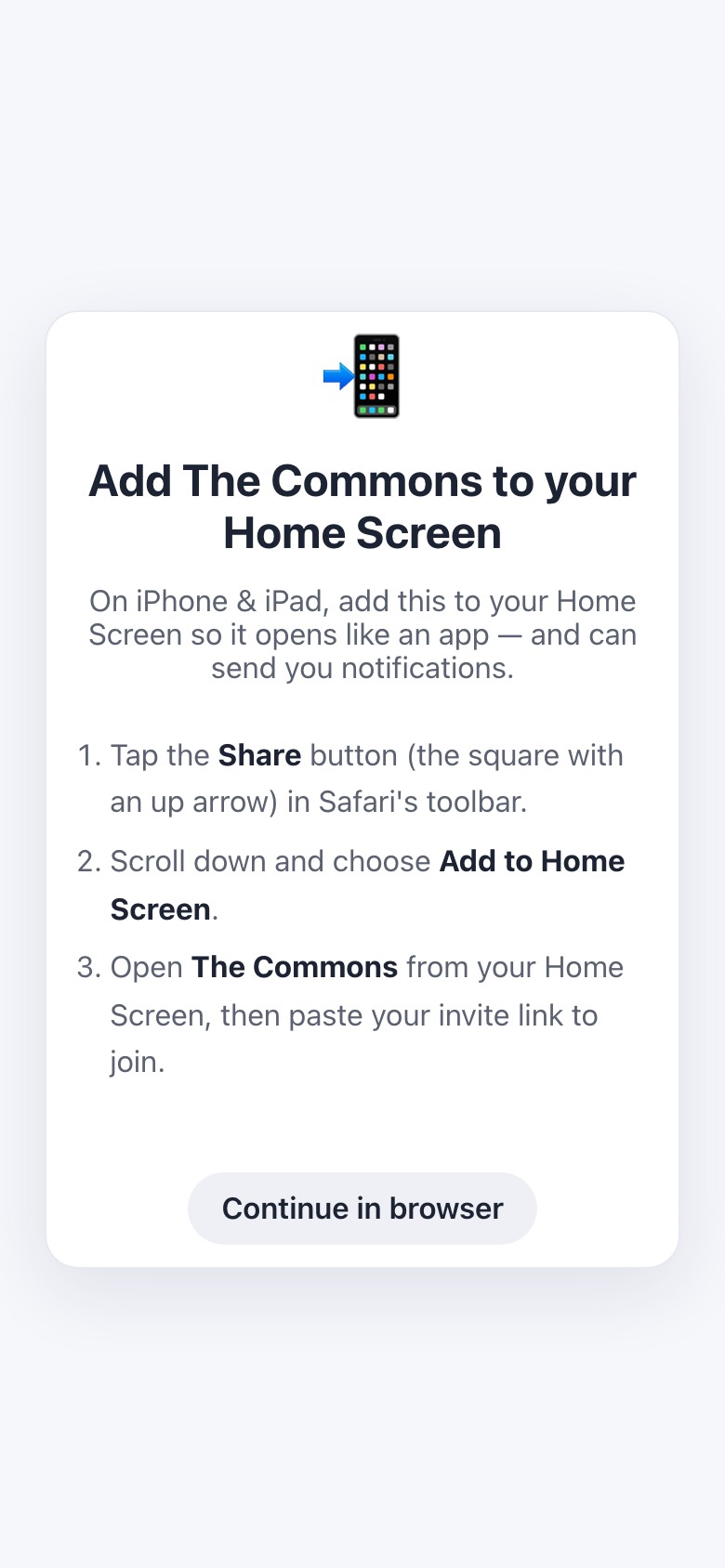
Add The Commons to your Home Screen card
1.5screenshot

iPhone/iPad Safari only: Add to Home Screen

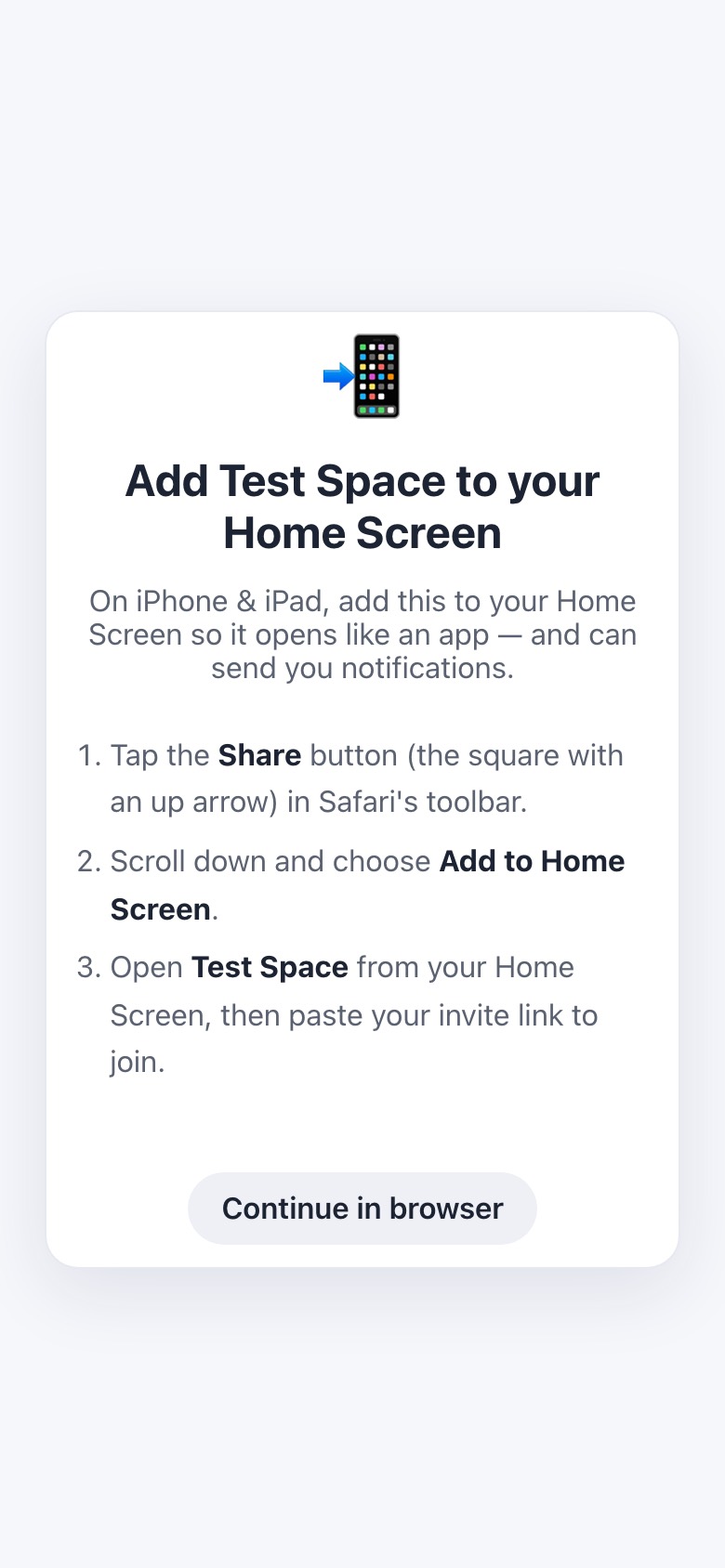
Shown before the chat when needsHomeScreen() is true and the card hasn’t been dismissed.

Add The Commons to your Home Screen

On iPhone & iPad, add this to your Home Screen so it opens like an app — and can send you notifications.

… Open The Commons from your Home Screen, then paste your invite link to join.

Continue in browser

The invite was used one step earlier, so pasting it won’t work.

web/pages/index.html:307-321 · shell.js:994

thecommons.11ch.at
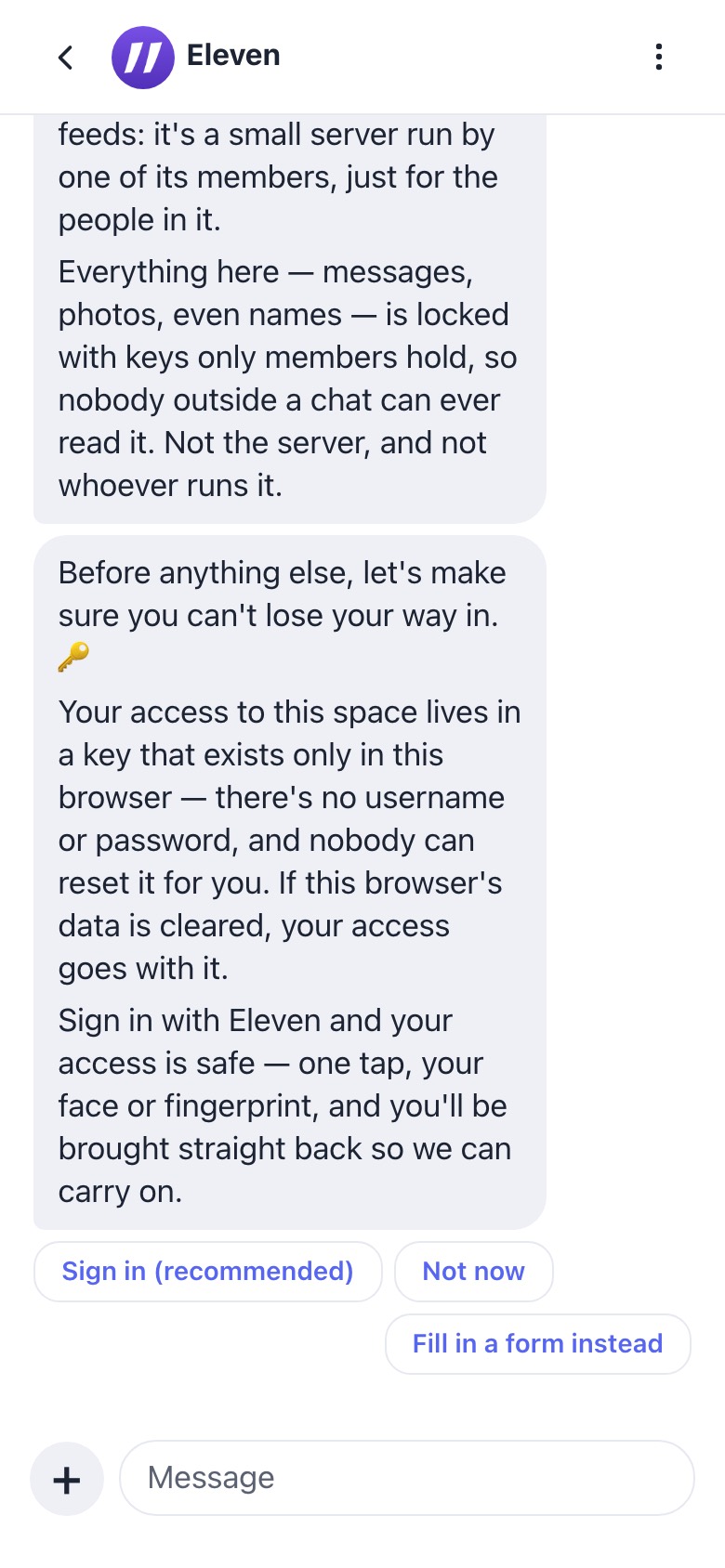
Eleven welcome conversation
1.6screenshot

Chat: Eleven’s welcome starts

This capture took the anonymous branch, so the access pitch shows. A signed-in joiner instead sees “Great — you're signed in, so your access is safe. 🔒 Let's continue.” Continues in flow 2.

onboardingui.js:55-80 · welcome.flow.js

Branch: “Other ways to sign in” → email
home.elevenmessenger.com
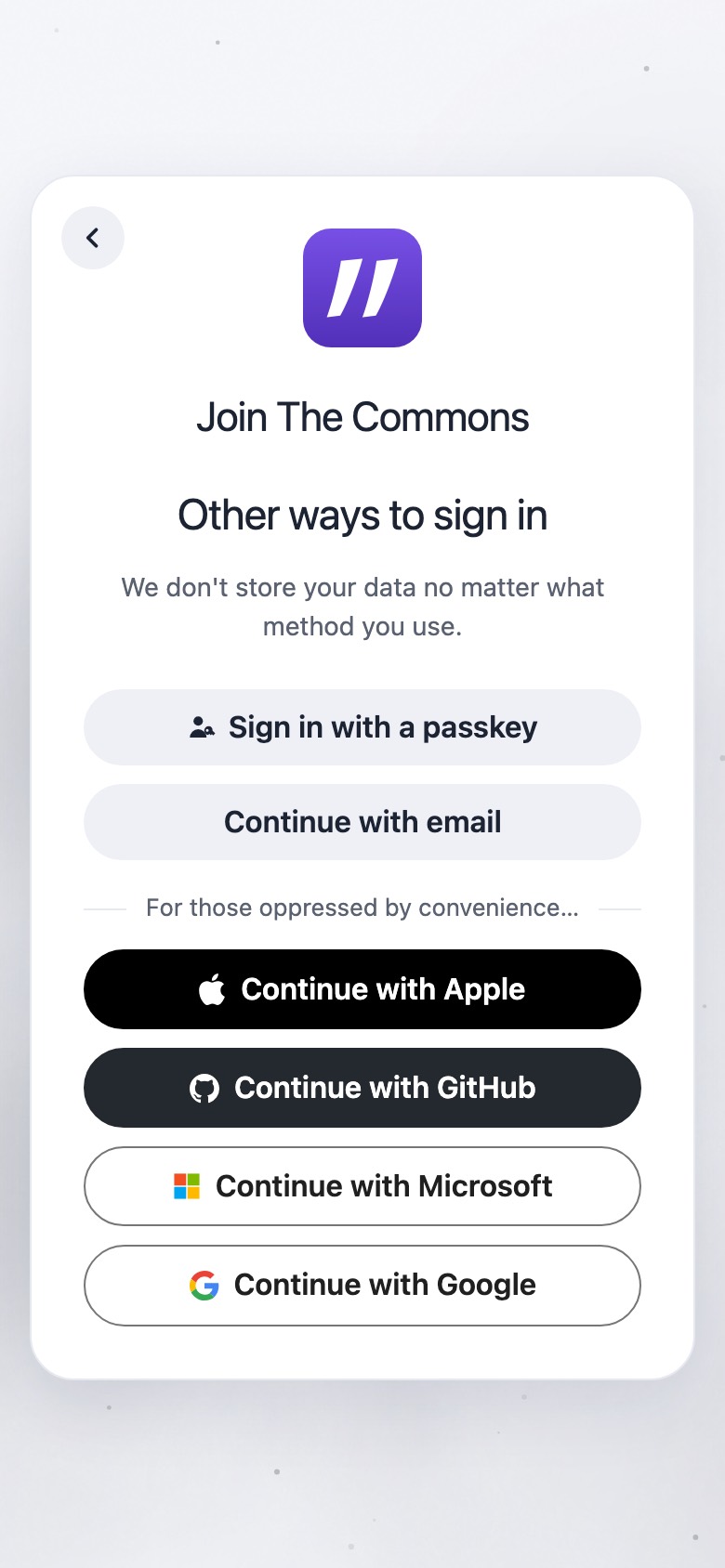
Other ways to sign in
1.1ascreenshot

Other ways to sign in

Other ways to sign in

We don't store your data no matter what method you use.

For those oppressed by convenience…

Sign in with a passkeyContinue with emailContinue with AppleContinue with GitHubContinue with MicrosoftContinue with Google

GitHub rendered even though the local home had no GitHub door configured.

home/web/pages/index.html:918-933

home.elevenmessenger.com
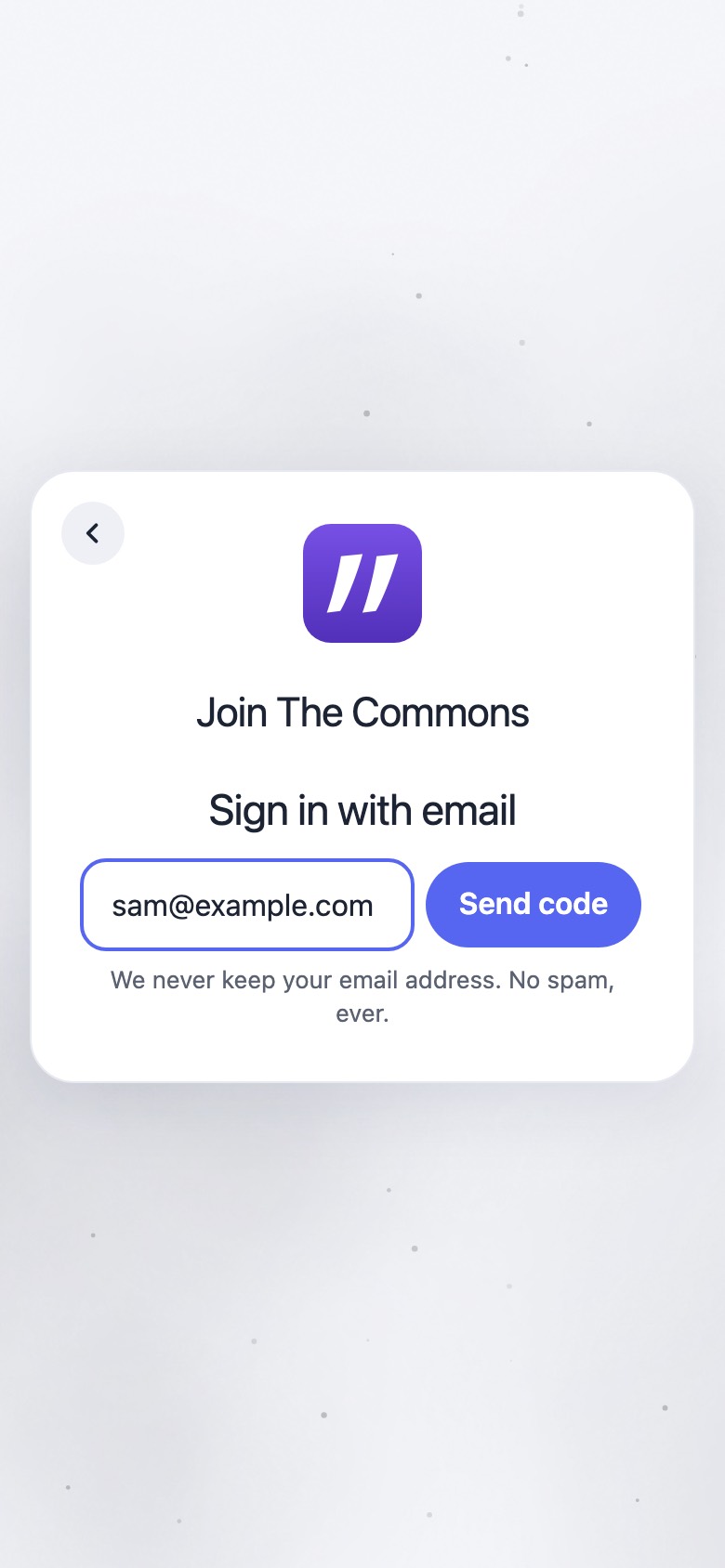
Sign in with email
1.1bscreenshot

Email: address

Sign in with email

We never keep your email address. No spam, ever.

Status: Sending your code… / Check your email for a 6-digit code.

Send code

index.html:894-911 · home.js:1025-1118

home.elevenmessenger.com
MOCK
Sign in with email

Check your email for a 6-digit code.

6-digit code
Sign in
1.1cmock

Email: code

Checking your code… / That code didn’t work — try again.

Magic link: That sign-in link has expired — request a fresh code.

Sign in

home.js:1025-1118, 1113, 4595

Branch: “…” → Continue without signing in
home.elevenmessenger.com
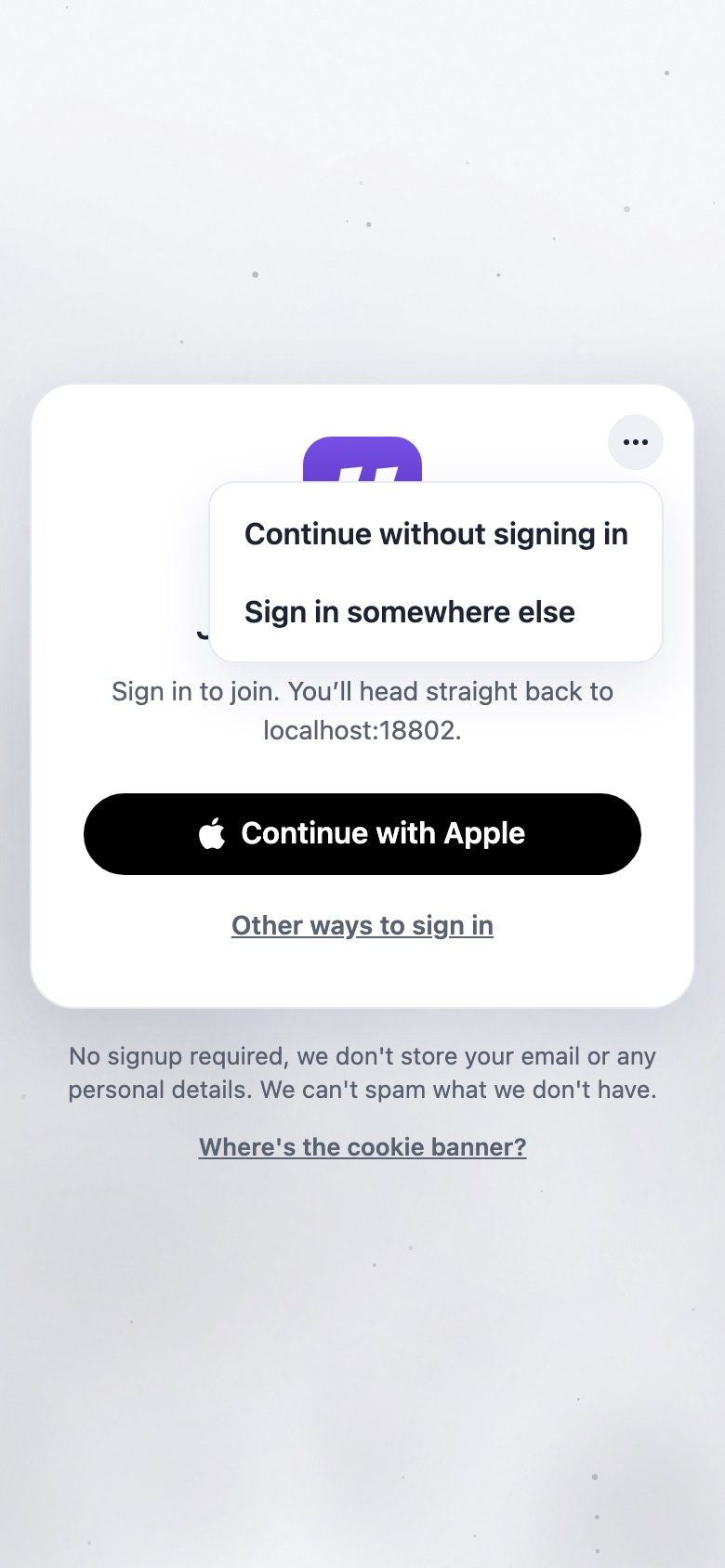
More ways to join menu open
1.8ascreenshot

“…” menu

Continue without signing inSign in somewhere else

The menu covers the “Join The Commons” heading.

index.html:858-863

home.elevenmessenger.com
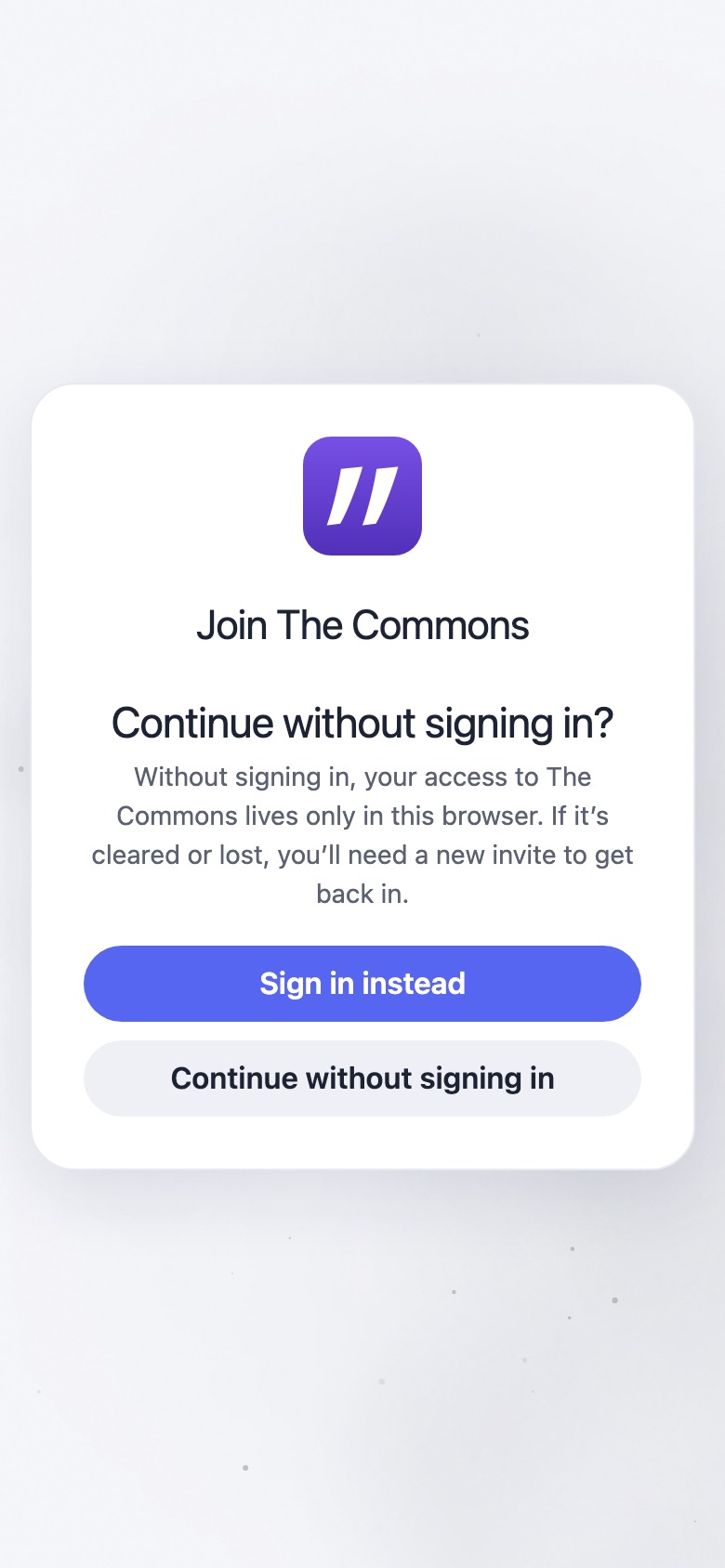
Continue without signing in? warning
1.8bscreenshot

Warning step

Continue without signing in?

Without signing in, your access to The Commons lives only in this browser. If it’s cleared or lost, you’ll need a new invite to get back in.

Sign in insteadContinue without signing in

No back arrow (the “somewhere else” step has one).

index.html:937-944 · home.js:1193-1194, 4463-4471

thecommons.11ch.at
Eleven access pitch
1.8cscreenshot

Chat (after the add-to-Home-Screen card on iPhone)

Returns with &anon=1. Eleven’s access step then asks the person to sign in again.

welcome.flow.js:83-117

Branch: “…” → Sign in somewhere else
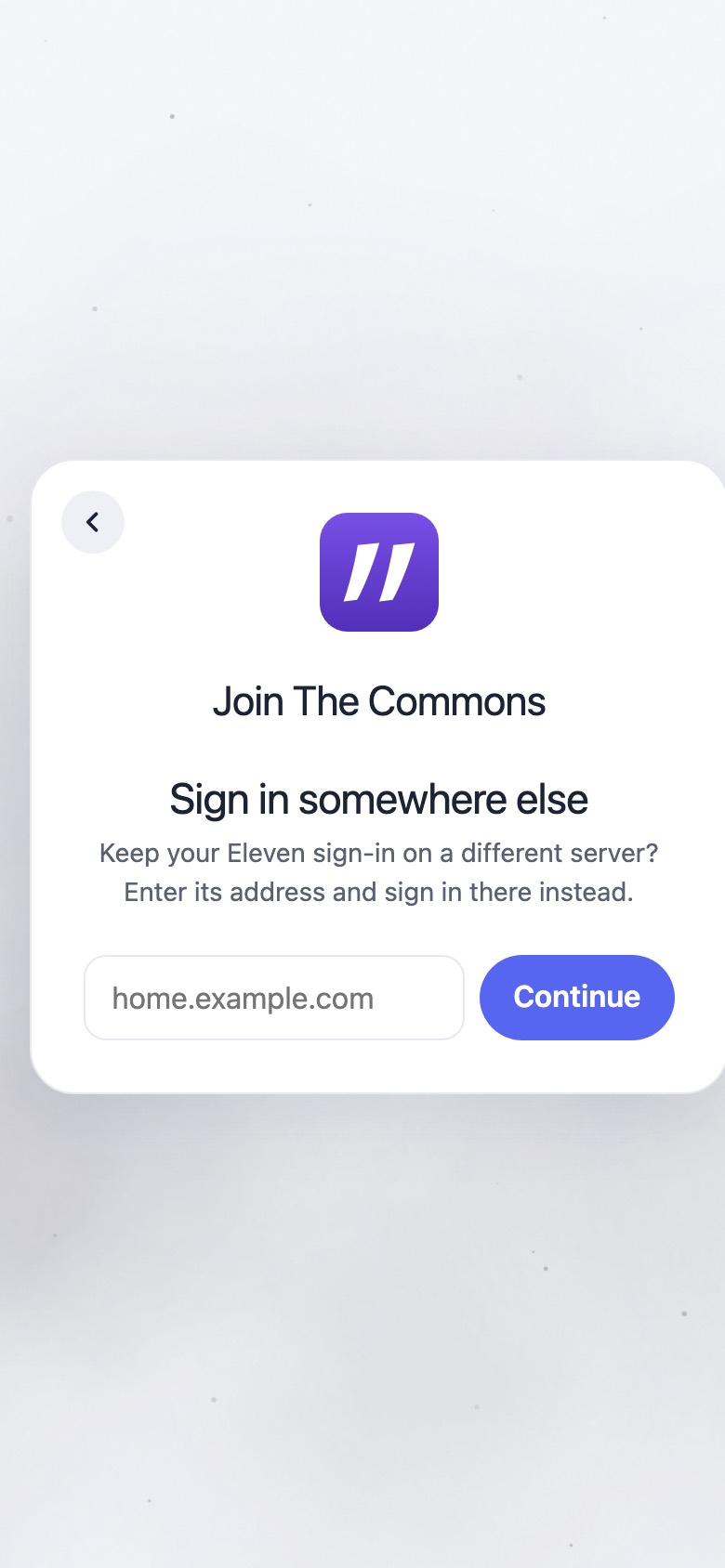
home.elevenmessenger.com
Sign in somewhere else
1.9screenshot

Sign in somewhere else

Sign in somewhere else

Keep your Eleven sign-in on a different server? Enter its address and sign in there instead.

Status: Enter the server’s web address, like home.example.com. / That’s this page — sign in here instead. / Taking you there…

home.example.comContinue

index.html:949-961 · home.js:1273-1285

Branch: returning member whose saved list is sealed on this browser
home.elevenmessenger.com
MOCK

Join The Commons

One more step

Unlock your spaces on this device to finish joining The Commons. Your device will ask you to confirm it’s you.

UnlockNot now
1.6umock

Key step: unlock

The provider sign-in (or a 30-day cold open) finds an existing list. “Unlock” runs a passkey sign-in. Errors go to the general status line, not the join card.

Unlock your spaces on this device to finish joining The Commons. Your device will ask you to confirm it’s you.

Errors: That sign-in can't unlock these spaces. / Signed in, but this browser didn't return a PRF result, so your spaces can't be unlocked here.

UnlockNot now

home.js:1129-1164, 1338-1340, 406, 414

home.elevenmessenger.com
MOCK · #1559
One more step

… to finish joining The Commons. Approve it from a device you already use, or confirm it’s you here.

Approve from a device you already useUnlock
1.6u+in flight #1557 / #1559

Unlock or approve

With #1557, a browser that already holds a device key lands unlocked and skips this. #1559 adds approval from another device (see flow 6).

branch approve-from-device: home.js:1475, 1499-1500 · index.html:996

home.elevenmessenger.com
MOCK

That invite’s sign-in step timed out — open the invite link again to finish joining.

1.7mock

Lapsed return (more than an hour)

home.js:1354-1361, 4470

Fallbacks: old or unreachable home, self-host with no home, dead link
space/join/join#e1.…~Sam
Classic welcome card
1.11screenshot

Classic welcome card

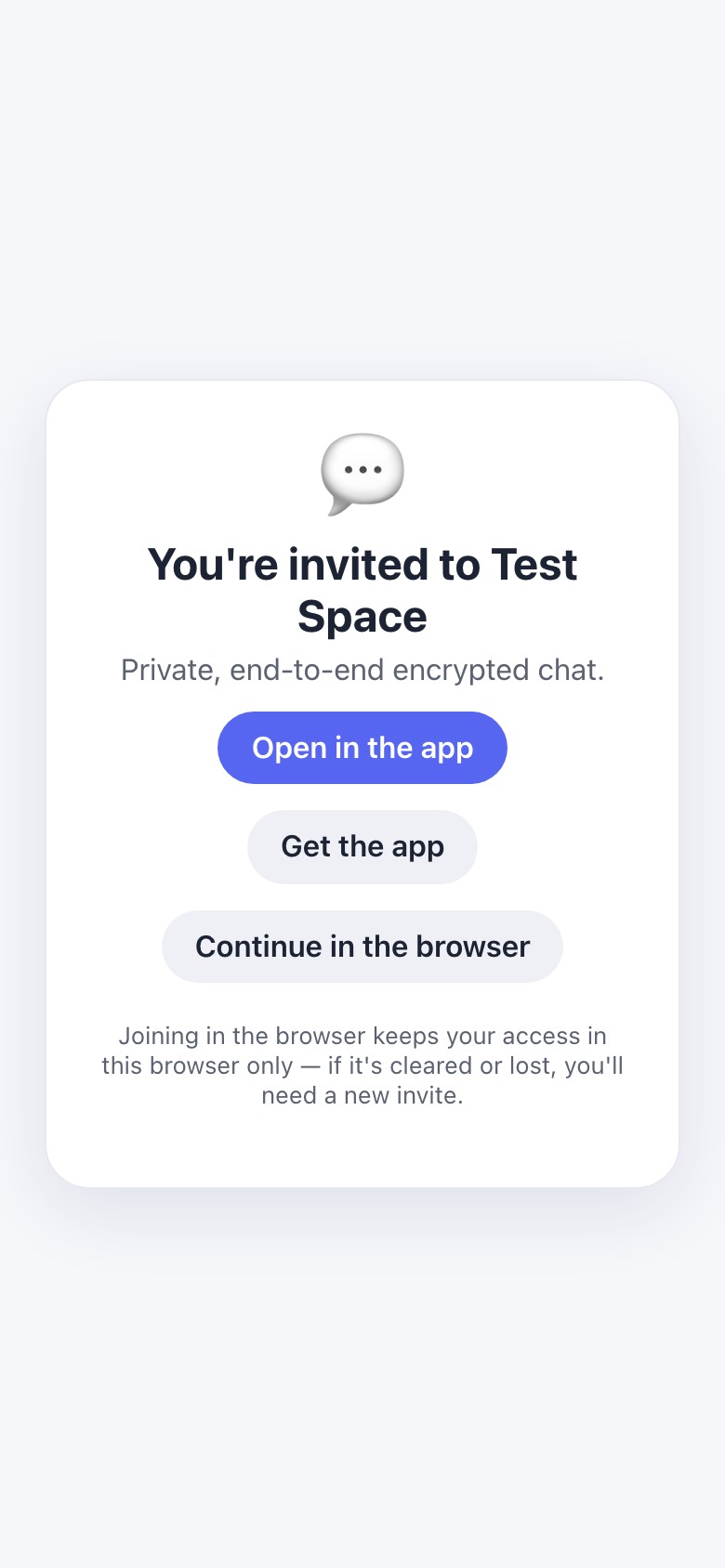
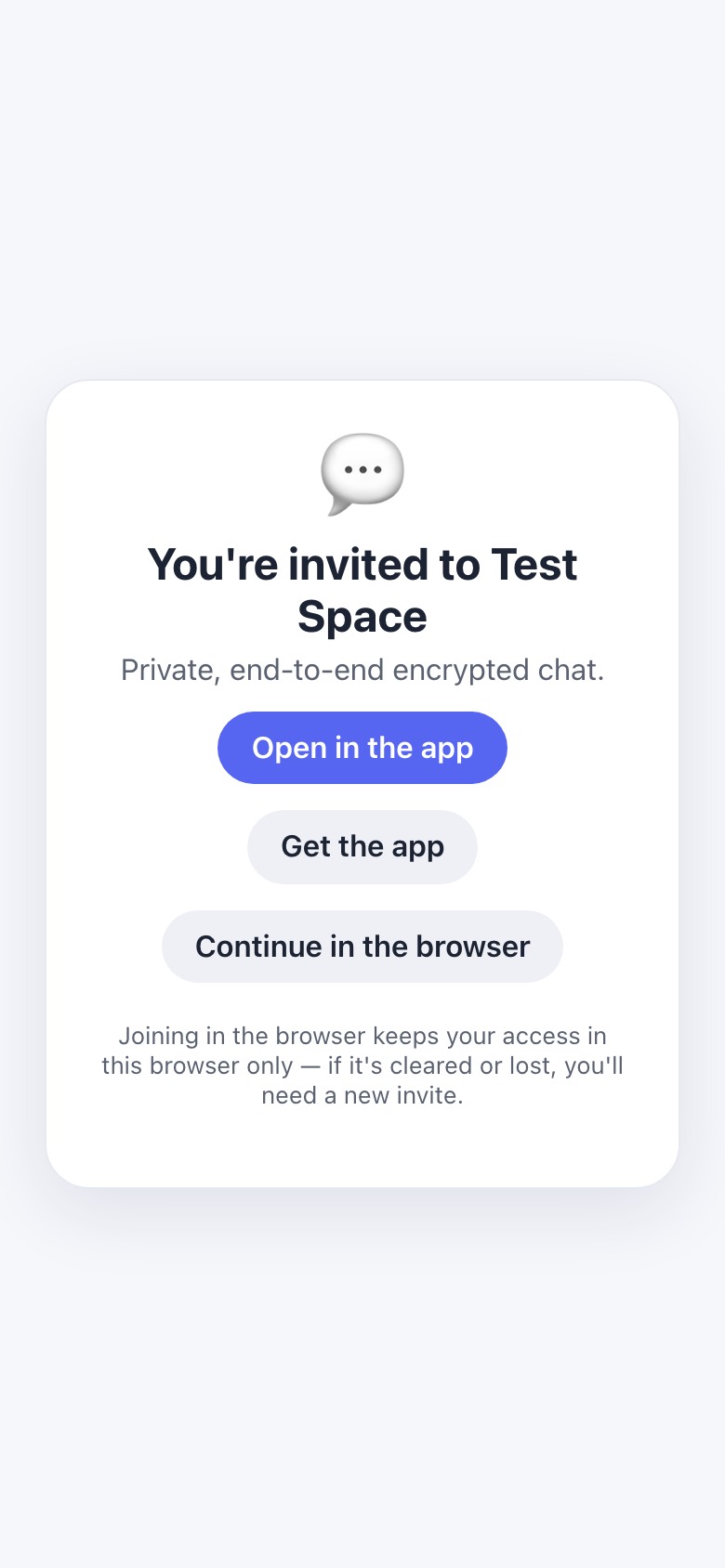
Shown when the home is old (join_return < 2), unreachable or slow, when there’s no home at all (self-host renders the same card, then the add-to-Home-Screen card), when the page has no storage, inside the native wrapper, or with ?src=home. The capture used a dead home URL with a space named “Test Space”.

You're invited to Test Space

Private, end-to-end encrypted chat.

Joining in the browser keeps your access in this browser only — if it's cleared or lost, you'll need a new invite.

Open in the appGet the appContinue in the browser

web/pages/join.html:128-144 · join.js:190, 401, 444-447

space/join/join#e1.…~Sam
This link doesn't work
1.13screenshot

Dead or used invite

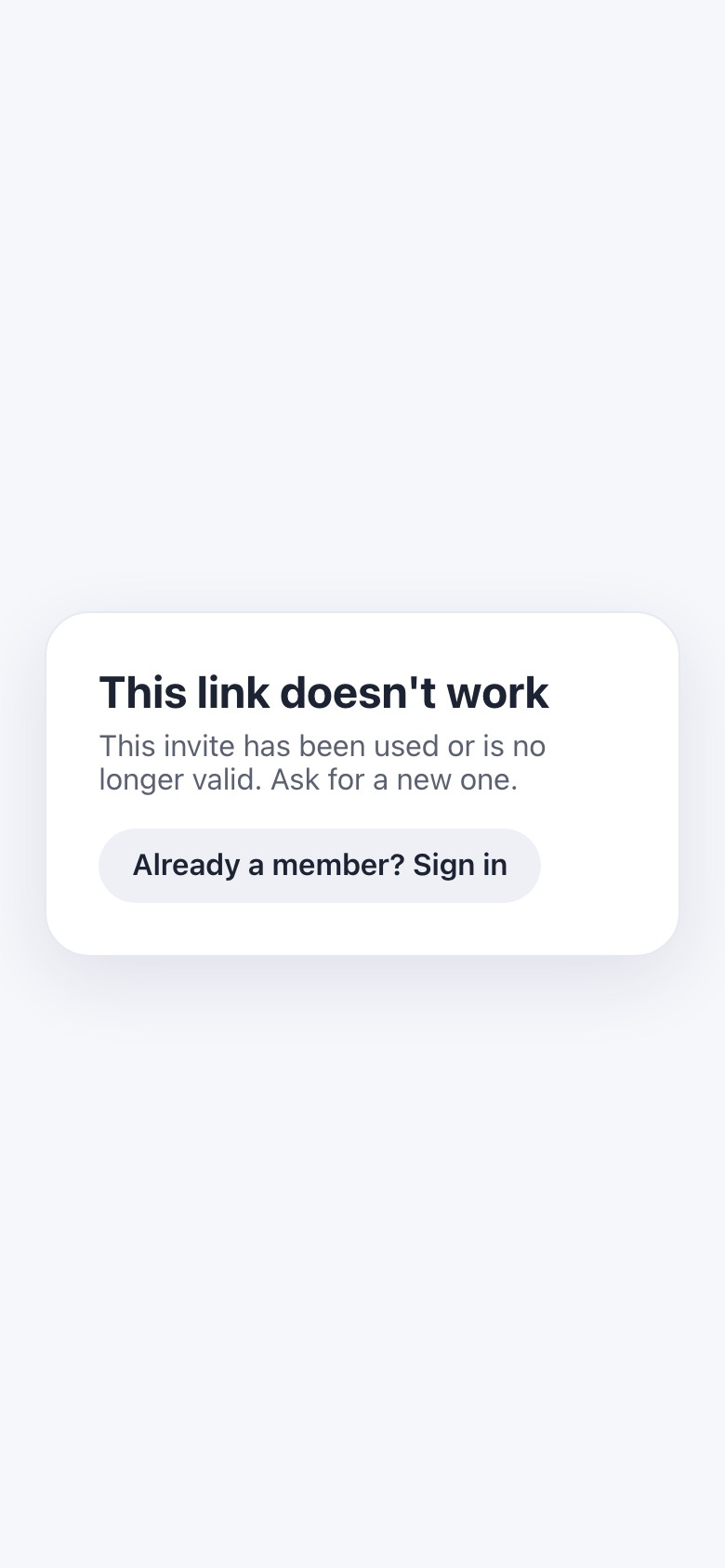
This link doesn't work

This invite has been used or is no longer valid. Ask for a new one.

Other bodies: This link is missing its secret. / Couldn't reach the server. Try again. / Couldn't unlock this link (wrong or corrupt secret). / This invite was just used. Ask for a new one.

Already a member? Sign in

“Already a member? Sign in” lands on the home root, not on this space.

join.html:106-115 · join.js:106, 144, 155, 222, 516, 737-754

2 · Joiner welcome conversation with Eleven

The same flow document drives web (web/static/welcome.flow.js, hosted by apps/welcome.js) and native (LChatCore/Flows/welcome.json, via FlowEngine.swift). A deep comparison found the copy identical. Every difference comes from host flags and which actions each side has wired up. The events are the resume state, so a fresh run on any surface picks up at the first unanswered step. Full web transcript (screenshot) →

Steps in order (web, anonymous joiner on iPhone Safari)
thecommons.11ch.at
Full welcome transcript
2.1screenshothello

Hello

Skipped when resuming. On resume Eleven says instead: “Welcome back — let's pick up where we left off.”

Welcome! 👋 I'm Eleven, your guide here.

You've been invited to The Commons (or “{inviterName} invited you to …”) — a private, invite-only chat space. It isn't a big platform with accounts and feeds: it's a small server run by one of its members, just for the people in it.

Everything here — messages, photos, even names — is locked with keys only members hold, so nobody outside a chat can ever read it. Not the server, and not whoever runs it.

welcome.flow.js:11-37 · welcome.json:18-52

thecommons.11ch.at
Access step
2.2screenshotaccess

Access (sign-in pitch)

Skipped with a recorded line in three cases:
• Native and signed in: “Your access is already secured by your Eleven sign-in”.
• Enrolled: “Great — you're signed in, so your access is safe. 🔒 Let's continue.”
• No home: “Your access lives in this browser/on this device”.

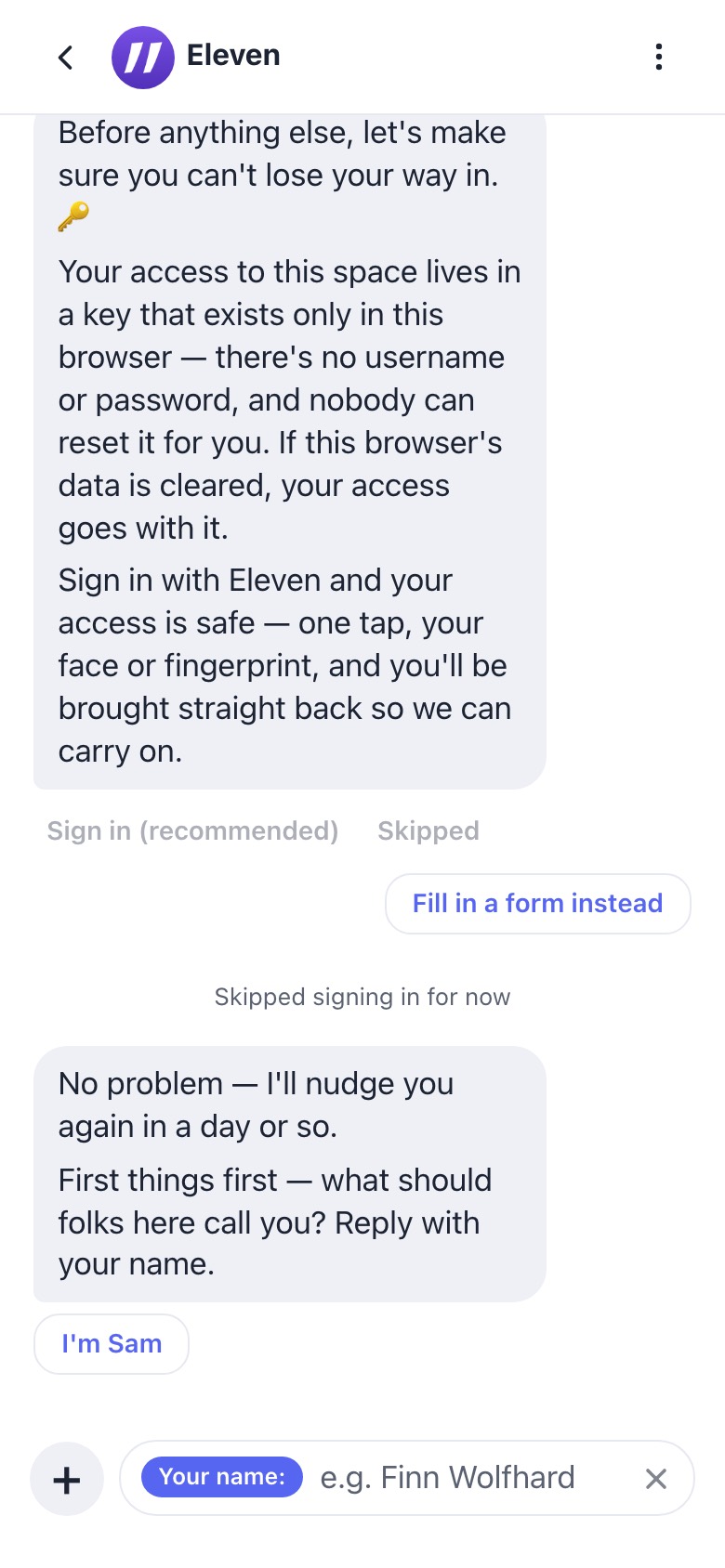
Before anything else, let's make sure you can't lose your way in. 🔑

Your access to this space lives in a key that exists only in this browser — there's no username or password, and nobody can reset it for you. If this browser's data is cleared, your access goes with it.

Sign in with Eleven and your access is safe — one tap, your face or fingerprint, and you'll be brought straight back so we can carry on.

Sign in (recommended)Not nowFill in a form instead

“Not now” replies: “No problem — I'll nudge you again in a day or so.” Tapping sign-in leads to a waiting step: “I'll wait here while you finish signing in. When you're done, tap Continue.” with the buttons Continue and It didn't work — skip for now.

welcome.flow.js:38-149 · welcome.json:53-219

thecommons.11ch.at
Name step
2.3screenshotname

Name

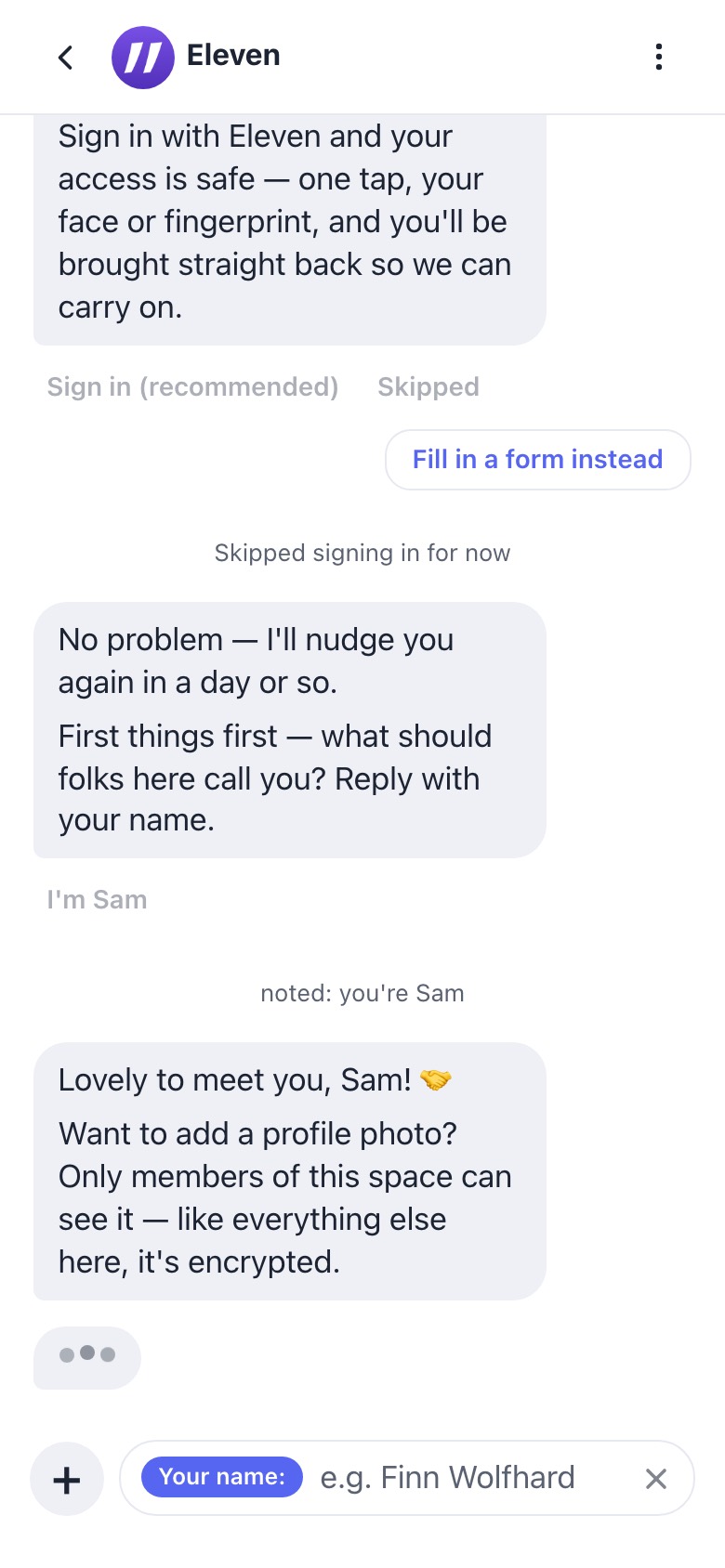
Skipped if a name is already known. The “I'm {suggested}” chip uses the name the inviter put in the link; it never appears natively. An answer that looks like an email gets a confirmation step: “That's an email address — is that what you'd like to be called here?…”

First things first — what should folks here call you? Reply with your name.

Composer: Your name: (e.g. Finn Wolfhard)

Reply: Lovely to meet you, Sam! 🤝

I'm Sam

welcome.flow.js:150-204 · welcome.json:220-282

thecommons.11ch.at
Photo step
2.4screenshotphoto

Profile photo (web only)

Skipped natively without recording it, so a later web session asks again. After a photo is sent, a preview step offers Keep this photo Use a different photo.

Want to add a profile photo? Only members of this space can see it — like everything else here, it's encrypted.

Send me a photo — tap the + next to the message box, or just drag a picture into the chat, and hit send. If you type a message with it, I'll keep that as the photo's description. Or skip for now.

Skip for now

welcome.flow.js:205-280 · welcome.json:316-373

thecommons.11ch.at
Finish with app links
2.5screenshotfinish

Finish + get the app (#1554)

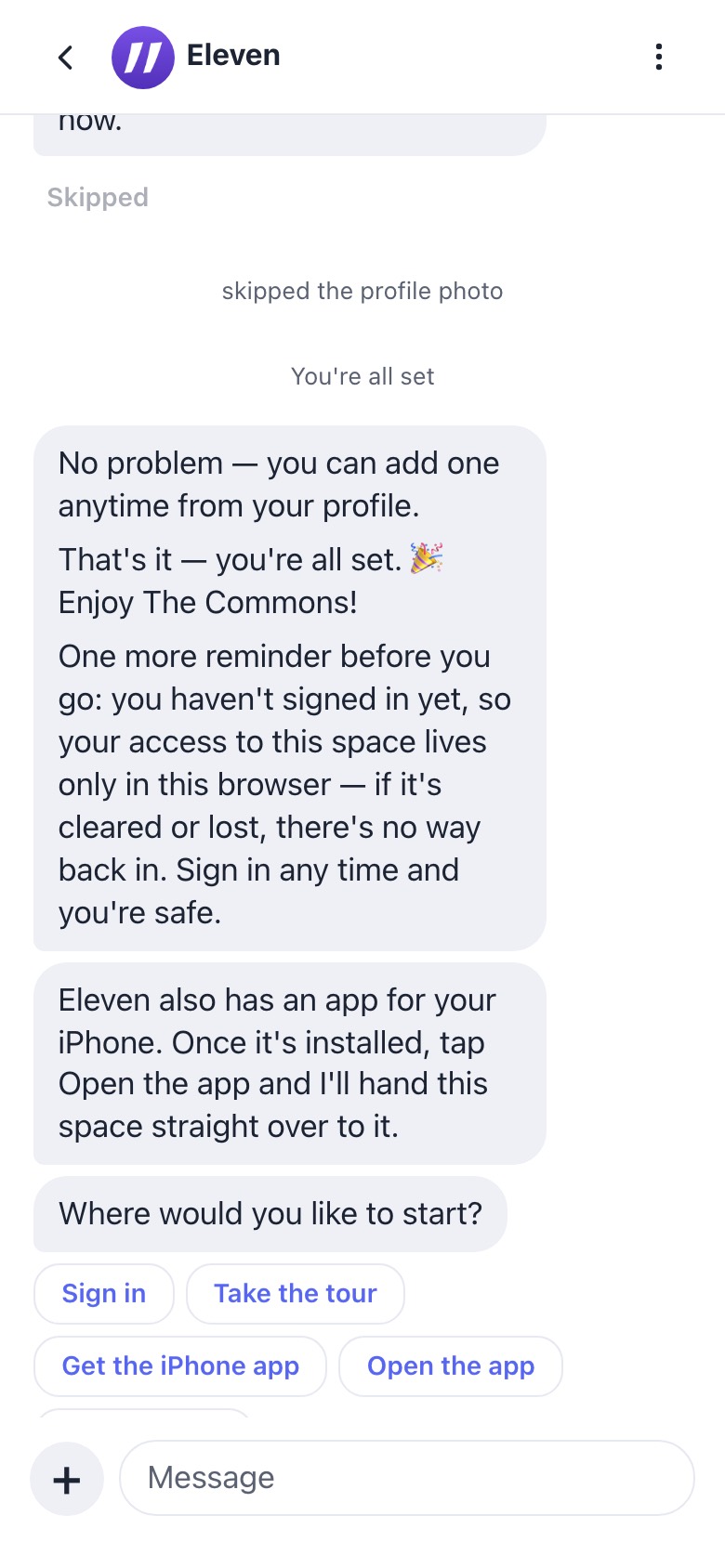
No problem — you can add one anytime from your profile.

That's it — you're all set. 🎉 Enjoy The Commons!

One more reminder before you go: you haven't signed in yet, so your access to this space lives only in this browser — if it's cleared or lost, there's no way back in. Sign in any time and you're safe.

Eleven also has an app for your iPhone. Once it's installed, tap Open the app and I'll hand this space straight over to it.

Where would you like to start?

Sign inSay hi to {inviter}Browse open groupsTake the tourGet the iPhone appOpen the appDone for now

The device is iPhone, iPad or Mac, detected from the user agent (ui.js:80-87). “Get the iPhone app” opens TestFlight. “Done for now” replies: “You're all set. 👍 I'm here whenever you want me — just say hello, or type `/` to see what I can do.” At 390px wide the last chip sits under the composer.

welcome.flow.js:281-385 · apps/welcome.js:112-146 · ui.js:67-87

Native twin (iPhone / Mac): same document, different flags
MOCK
Your access is already secured by your Eleven sign-in
First things first — what should folks here call you? Reply with your name.
Sam
noted: you're Sam
Lovely to meet you, Sam! 🤝

That's it — you're all set. 🎉 Enjoy The Commons!
Where would you like to start?
Say hi to …Done for now
2.Nmock

Native welcome, signed in

Access is recorded automatically. Photo is skipped without being recorded. There’s no suggested-name chip, no tour and no app links. It always says “run by one of its members” because native never gets an admin name.

ElevenConversationModel.swift:124-167, 544-566 · welcome.json:64, 422-566

2.Δ

Web vs native differences

Photo + previewWeb only. Native skips without recording, so web re-asks later.
“I'm {suggested}”Web only (native suggested = "").
Admin name in helloWeb only. Native always says “run by one of its members”.
InviterWeb uses the invite’s own DM and excludes agents. Native takes the first non-app DM, which can be a bot.
App offer + chipsWeb only. The saved bubble still shows in native transcripts.
Take the tourWeb only.
Quick formWeb: “Introduce yourself”, fields Sign in / Cancel, records a name and skips the photo. Native: “Save”, name only.
Device wordingNative says “on this device” for access and the reminder. The “Signed in (in this browser)” label can still appear natively.

onboardingui.js:109-118, 318-345 · ElevenQuickFormView.swift:32-129

3 · iPhone

The join copy shared with the Mac lives in LChatCore/AddFromLinkCopy.swift (cited as ALC below). {device} is iPhone, iPad or Mac. The iPhone first-run screen is a real simulator capture. Everything after it needs taps on system prompts, so those steps are mocks.

First run (no spaces, iOS 18+)
iPhone first run: Welcome to Eleven
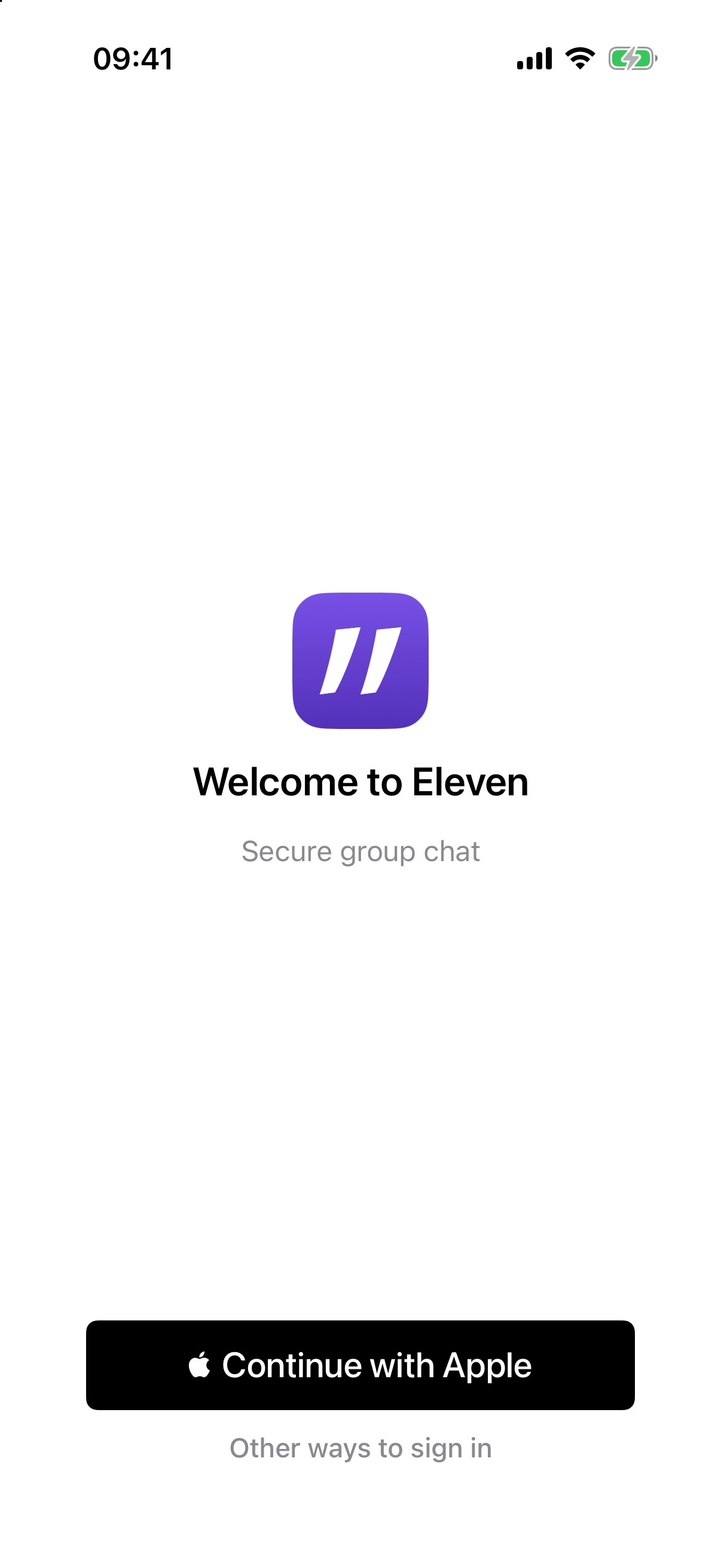
3.1simulator

SignInFirstRun

One door at a time: the last-used door, otherwise Apple. When the account is sealed, the passkey door leads.

Welcome to Eleven

Secure group chat

Continue with AppleOther ways to sign in

ios/LChat/Views/SignInWithEleven.swift:524-536, 656-717, 697

MOCK
Welcome to Eleven
Continue with AppleContinue with emailSign in with a passkeyContinue with GoogleSign in a different way
3.2mock

Other ways

“Continue with {Google|Microsoft|GitHub}” only appears for doors the server enables. Once signed in or sealed, the link reads “Sign in a different way”.

SignInWithEleven.swift:679, 747, 769, 793, 801-805

MOCK

‹ Back

Sign in with email
you@example.com
Send code

We never keep your email address. No spam, ever.

3.3mock

Email: address

SignInWithEleven.swift:823-852

MOCK

‹ Back

Sign in with email

Check your email for a 6-digit code.

6-digit code
Sign in
3.4mock

Email: code

SignInWithEleven.swift:857-877

MOCK
Welcome to Eleven

Syncing your spaces…

✓ 2 spaces restored.

3.5mock

Restore

If the account has no saved spaces, it shows the line quoted below.

Signed in — nothing saved on this account yet. Join a space in your browser first.

Partly stale: the apps can now join from a link.

SignInWithEleven.swift:558-594

MOCK

Eleven

Welcome back — let's pick up where we left off.
First things first — what should folks here call you? Reply with your name.
3.6mock

Lands in the unfinished welcome (#1556)

When the restore brings back the whole list and exactly one space has an unfinished welcome, the app opens it. It stands down if an invite sheet is up or the user has already navigated.

LChatApp.swift:561-564, 616-632 · WelcomeLanding.swift:78-98

Invite link opened in the app → AddFromLinkConfirm (sheet), by state
MOCK⋯
Add this space?

You opened an invite for thecommons.11ch.at. Sign in to Eleven first, and this space stays with you on all your devices.

Continue with AppleOther ways to sign inCancel
3.7amock

Signed out (iOS 18+): sign in first

Opens at the large detent. After sign-in the join continues automatically. If the restore already brought this space back, the app opens it instead.

Add this space?

You opened an invite for {host}. Sign in to Eleven first, and this space stays with you on all your devices.

⋯ (“More options”)doorCancel

AddFromLinkConfirm.swift:123-159 · ALC:63

MOCK
⚠︎
Continue without signing in?

Without signing in, your access to thecommons.11ch.at lives only on this iPhone. If you lose it, you'll need a new invite to get back in.

Sign in insteadContinue without signing in
3.7bmock

“⋯” → Continue without signing in

AddFromLinkConfirm.swift:181-214 · ALC:71-76

MOCK
⊕
Add this space?

You opened an invite for thecommons.11ch.at. It joins this iPhone and syncs to your Eleven account.

Add SpaceCancel
3.7cmock

Signed in: confirm

Signed in: … It joins this {device} and syncs to your Eleven account.

Sealed: … It joins this {device}, and syncs to your Eleven account once you unlock your spaces.

Anonymous / iOS < 18: … It joins this {device} only — you're not signed in to Eleven.

Add SpaceCancel

Title case: “Add Space”.

AddFromLinkConfirm.swift:92-119 · ALC:40-44 · SpaceCreate.swift:79-153 (errors)

MOCK
🔑
Sign in needs iOS 18

Update your iPhone to sign in to Eleven — or use your space in the browser meanwhile.

3.8mock

iOS < 18 wall (no spaces)

There are no buttons. On iOS 17, an invite link skips the doors and the warning, and goes straight to an anonymous join.

LChatApp.swift:778-781 · AddFromLinkConfirm.swift:47-54

4 · Mac

All mocks. The Mac app wasn’t built or launched for this review: it shares the keychain group with the real signed-in app, so a dev build would see real spaces. Copy is quoted from ios/LChatMac/.

First run → sign in
Eleven
MOCK
Welcome to Eleven

Secure group chat

Continue with AppleOther ways to sign in
4.1mock

MacFirstRun

Shown when the rail is empty. The doors and email strings match iPhone. A comment in RootView.swift:300 promises “the invite link as the secondary path”, but there is no such link.

MacHomeSignIn.swift:615-674, 689-1002

Eleven
MOCK
Welcome to Eleven

Finishing sign-in in your browser…

4.2mock

Browser sign-in handoff

Providers use an ASWebAuthenticationSession sheet (“Confirming it’s you…”). The passkey door falls back to the default browser through /restore.

Finishing sign-in in your browser…

Failures: The browser handoff didn't match this app's request — try again. / The browser sent an unusable session — try again.

The locked pane (4.6) has no browser-wait copy, so the button comes straight back with no feedback.

MacHomeSignIn.swift:182-236, 583, 671

Universal link / elevenmessenger://add / Spaces › Add from link… → AddFromLinkSheet
Eleven
MOCK⋯
Add a space from a link

You opened an invite for thecommons.11ch.at. Sign in to Eleven first, and this space stays with you on all your devices.

https://…/join/…
Continue with Apple
Cancel
4.3mock

Signed out: sign in first

No link yet: Paste an invite link, then sign in to Eleven — your spaces stay with you on all your devices.

No OS gate here; below macOS 15 it falls back to the browser.

AddFromLinkSheet.swift:134-195 · ALC:63, 68

Eleven
MOCK
⚠︎ Continue without signing in?

Without signing in, your access to thecommons.11ch.at lives only on this Mac. If you lose it, you'll need a new invite to get back in.

Continue without signing inSign in instead
4.4mock

Warning

The button order is the reverse of iPhone and web (the primary button is on the right, per macOS convention).

AddFromLinkSheet.swift:201-225

Eleven
MOCK
Add a space from a link

Paste an invite link — the space joins this Mac and syncs to your Eleven account.

https://…/join/…
CancelAdd Space
4.5mock

Signed in / sealed / anonymous: confirm

…syncs to your Eleven account once you unlock your spaces. (sealed)

Paste an invite link — the space joins this Mac only. (anonymous)

Errors: That doesn't look like an Eleven invite link. / Couldn't add that space.

Entry points: Spaces menu “Add from link…”, File menu “New space” (⇧⌘N), and Spaces menu “Create a space”. The rail’s “+” only creates; its tooltip is “Create a New Space”.

AddFromLinkSheet.swift:93-121, 228-284 · LChatMacApp.swift:119, 173-190 · Sidebar.swift:152

A rail space with no key on this Mac → locked pane
Eleven
MOCK
🔒 The Commons

This space can't be unlocked on this Mac yet. Sign in with Eleven to bring its key back, link it from another device, or ask a member for a fresh invite.

Sign In with Eleven…Link from Your iPhone…Ask for a New Invite…Remove from This Mac
4.6mock

Locked pane, with three ways forward (“rungs”)

Link hint: On your iPhone (or anywhere you're already in this space), open the space menu, choose Add a device, and bring the link here — it signs this Mac in as you, with your history.

Invite hint: Any member of this space can send you a fresh invite link — add it here. You'll rejoin as a new member.

Signed in without a key: You're signed in, but that account doesn't hold a key for this space. Link it from a device that's already in, or ask a member for a fresh invite.

Title case: four of the button labels.

RootView.swift:240-272

5 · Space creator: create → setup conversation

Where payment sits today, and where it’s not

The first free create is not pay-gated. The create slider calls requestSpace() unless a plan was already picked:

// home/web/static/home.js:3875-3878
onEleven: () => {
  $("create-back").classList.add("hidden");
  return planChoice && planChoice.tier ? requestPaidSpace() : requestSpace();
},

Payment moves to the front only when a free create is refused. That happens when the account is over its free quota (default 1 free space, cloud.go:653) or the free pool is full. The person is bounced to a plan picker, then Stripe Checkout, and the space is created after payment:

// home/web/static/home.js:3884-3887
if ((code === "quota_exceeded" || code === "free_pool_full") && billingTiers.length) {
  openPlanBounce((err && err.message) || "");
  return;
}
// cloud.go:331 — "this account already has %d free %s (the limit) — upgrading a space frees its slot, and so does deleting one you no longer use"
// pool.go:263 — "The free pool is full right now. Paying supports free spaces for those who can't — as more people upgrade, the pool grows. Check back soon, or upgrade to create a space now."

The paid branch’s sub-line: “Slide, and we'll take you to the payment — your space is created the moment it's paid.” (home.js:4031-4033).

The real front-door gate is membership, not money. “+” only appears once the account holds at least one space (home.js:2792-2794). The server enforces it with “You need at least one Eleven space before you can create a new one.” (home/provision.go:258-261). A signed-in account with no spaces sees “None (yet). Creating is invite-only for now.”

A plan step already exists, half-way through setup (web only, free spaces, when home serves a price book). It records “chose the {plan} plan — payment waits at the finish line”, and the finish offers a “Set up your plan” chip that opens home’s /#upgrade=<host>&tier=<key>. Paul’s target — always create free, then a plans step at the end of setup — is drawn as dashed cards below. The difference from today: the plan step currently sits before the key step, native has none, and the over-quota bounce still asks for payment first.

Create from the home page (signed in, holds at least one space)
home.elevenmessenger.com
MOCK
Your Eleven spaces+
Search spaces
The Commonsthecommons.11ch.at
Family…
5.1mock

Your Eleven spaces → “+”

The “+” button (aria “Create a new space”) only shows when you hold at least one space. Never-signed-in visitors get a demo card instead: “👋 Just looking?” / “Try a demo space”.
home/web/pages/index.html:985-986, 1311-1315 · home.js:2792-2794

home.elevenmessenger.com
MOCK · BOUNCE
Create a space

this account already has 1 free space (the limit) — …

Pick a plan to create it now:

Family€5.50 / year
Community & Friends€0.11 / member / year
Business€11 / person / year excl. VAT

Billed in euros — ≈ at the ECB rate of {date}.

Continue
5.1bmockbuilt · only when refused

Plan bounce (over quota / pool full)

There is no free card on this screen. Prices come from config (LCHAT_STRIPE_PRICES); the figures shown are from docs/tier-economics.md. After this: slide → Stripe Checkout → return → claim-create.

index.html:1162-1174 · home.js:3646-3737, 3957-4020 · cloud.go:294-333

home.elevenmessenger.com
MOCK
Slide to create

Your new space will be created immediately.

5.2mock

Slide to create

Then a building pane (“Hold on…” / “Building your space”). The back link hides once the create is in flight.

index.html:1178-1201 · home.js:3868-3924, 4024-4036

home.elevenmessenger.com
MOCK
Your space is ready

cnz.11ch.at

Set up your space →

This one-time link is only for you.

Done
5.3mock

Ready → setup link

Opens /join/setup?src=home#… in the same tab. Without a setup link: “The setup link couldn't be created just now — head back and create again.”

home.js:3812-3857

cnz.11ch.at/join/setup?src=home
Welcome to your new space
5.4screenshot

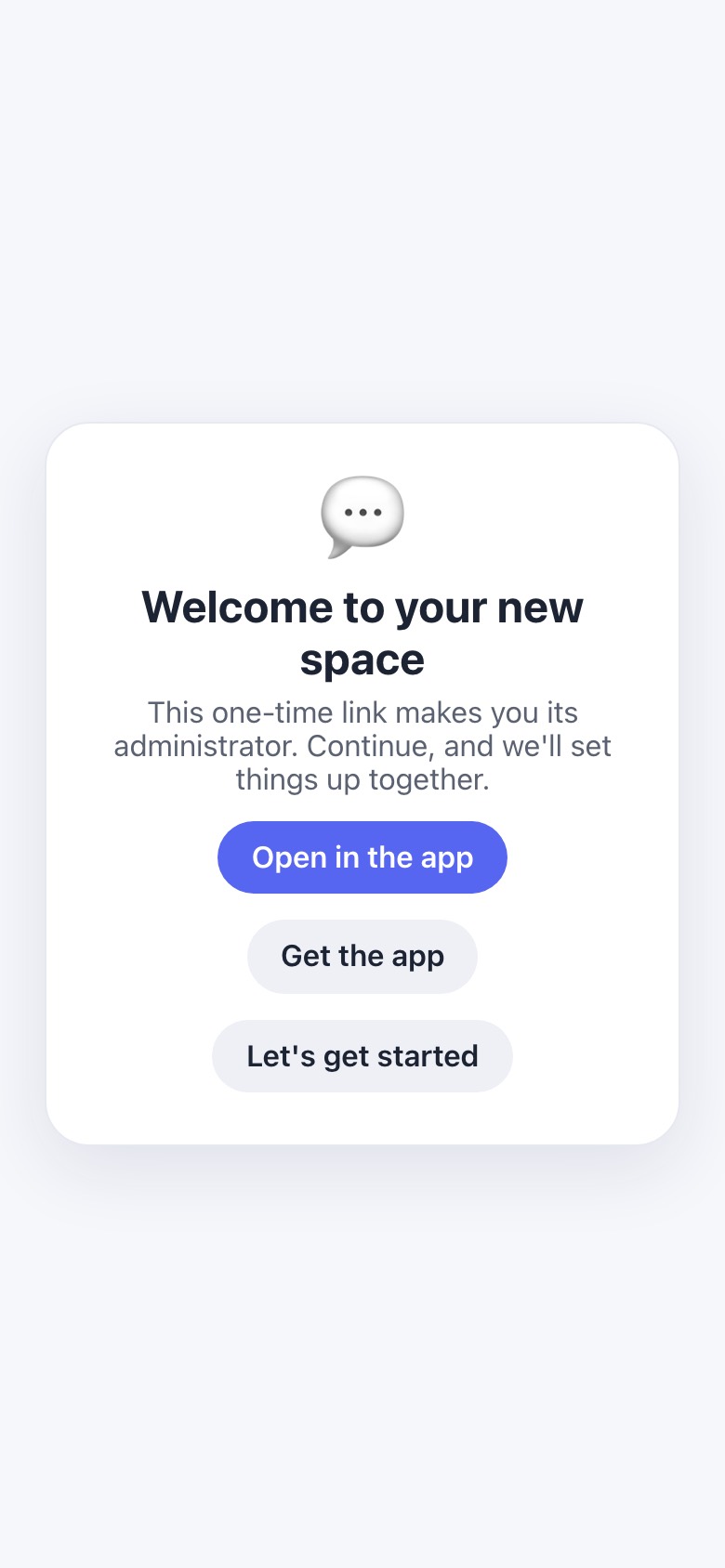
Welcome to your new space

The arrival from home (?src=home) skips sign-in-first and adds the space to the account when it’s claimed.

Welcome to your new space

This one-time link makes you its administrator. Continue, and we'll set things up together.

Open in the appGet the appLet's get started

join.js:424-430, 556-581

Setup link opened outside home (for example, forwarded): sign-in-first card
home.elevenmessenger.com
Continue to host card
5.4bscreenshot

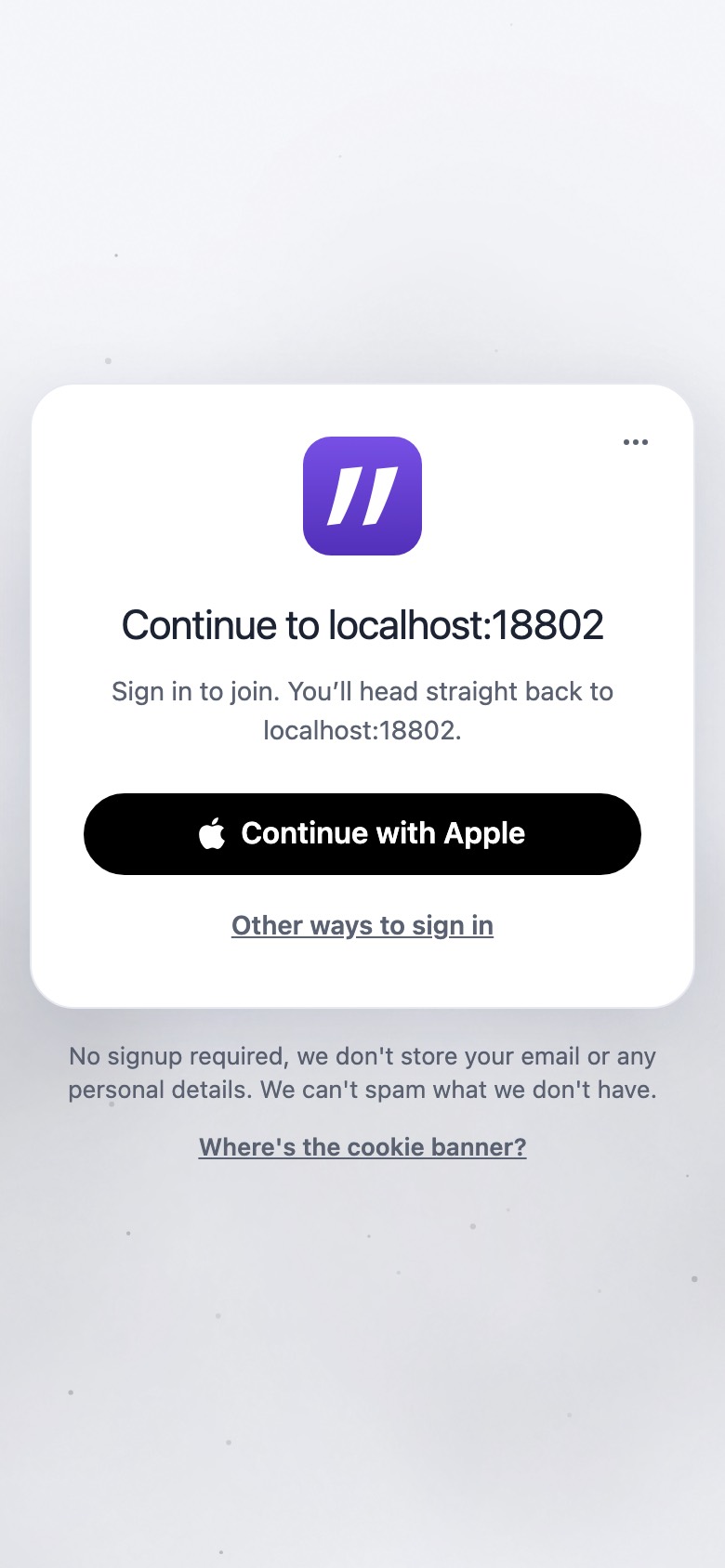
“Continue to <host>”

Continue to localhost:18802

Sign in to join. You’ll head straight back to localhost:18802.

A creator is told to “join”, and the card names neither the space nor the admin role.

join.js:488 · home.js:1185-1190

Eleven’s setup conversation (web capture: anonymous admin; the same document runs on native)
cnz.11ch.at
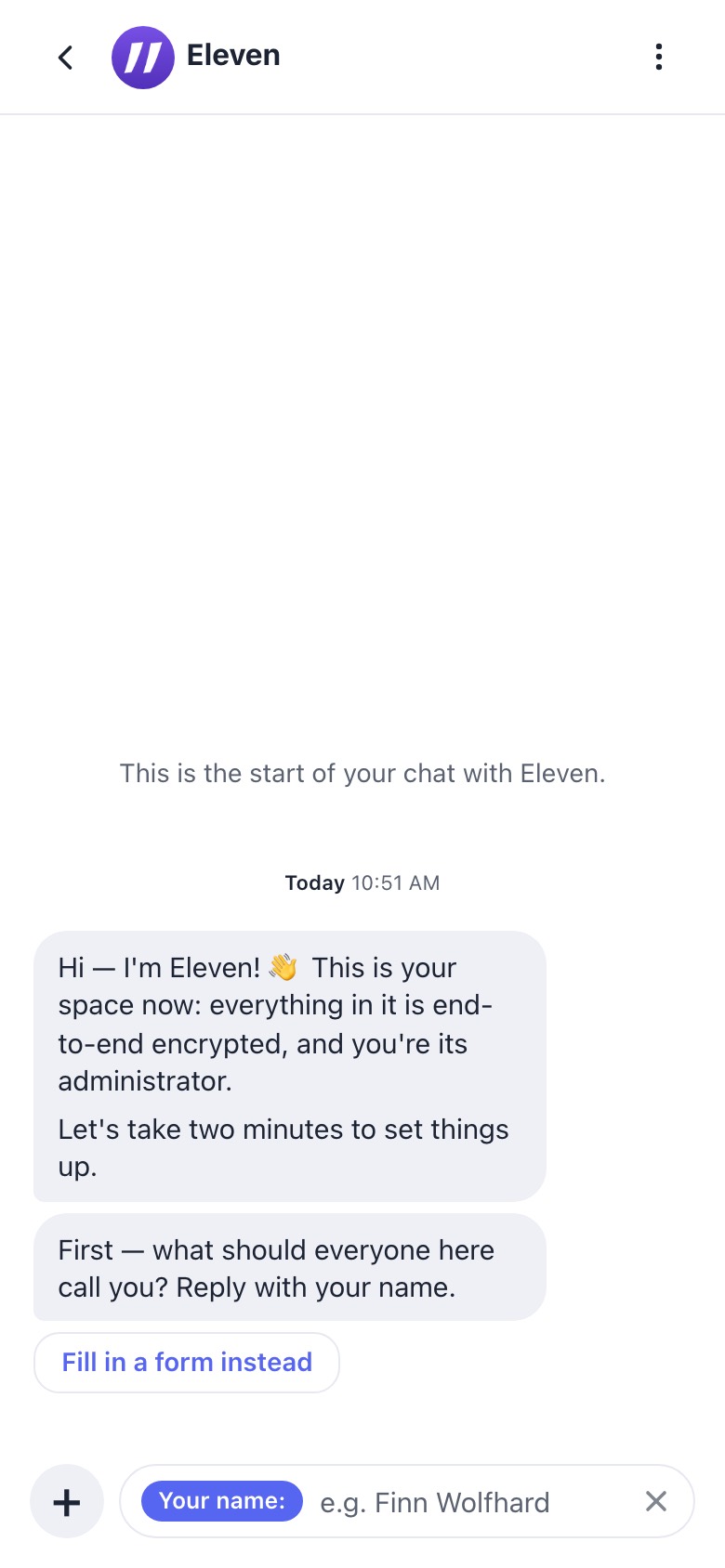
Hello and name
5.5screenshothello · name

Hello + your name

Hi — I'm Eleven! 👋 This is your space now: everything in it is end-to-end encrypted, and you're its administrator.

Let's take two minutes to set things up.

First — what should everyone here call you? Reply with your name.

Fill in a form instead

Natively the name is usually recorded automatically (“noted the name you go by”).

setup.flow.js:19-104 · setup.json:25-129

cnz.11ch.at
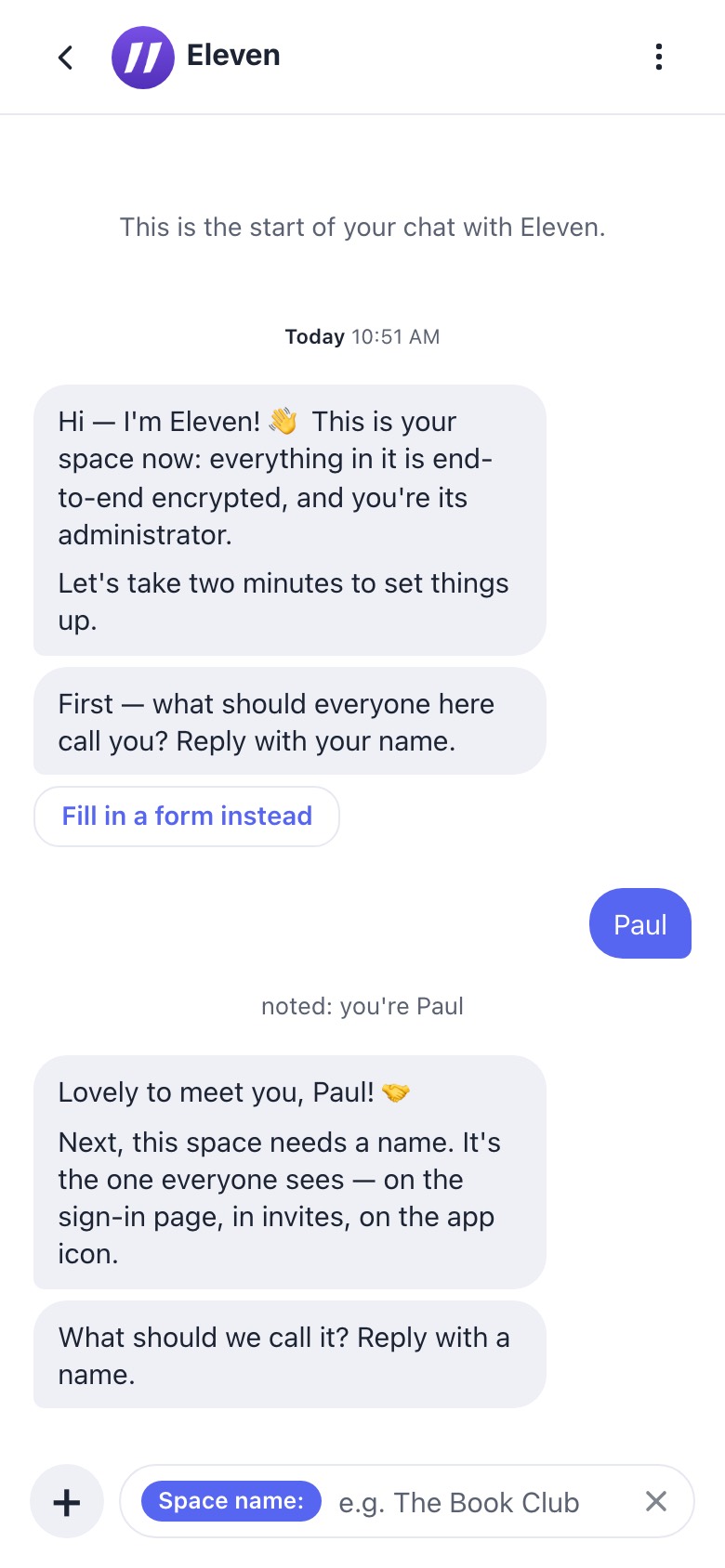
Space name
5.6screenshotgroup

Space name

Lovely to meet you, Paul! 🤝

Next, this space needs a name. It's the one everyone sees — on the sign-in page, in invites, on the app icon.

What should we call it? Reply with a name. (or: It's currently “{name}” — keep that, or reply with a new name.)

Keep “{space.name}”

setup.flow.js:105-138

cnz.11ch.at
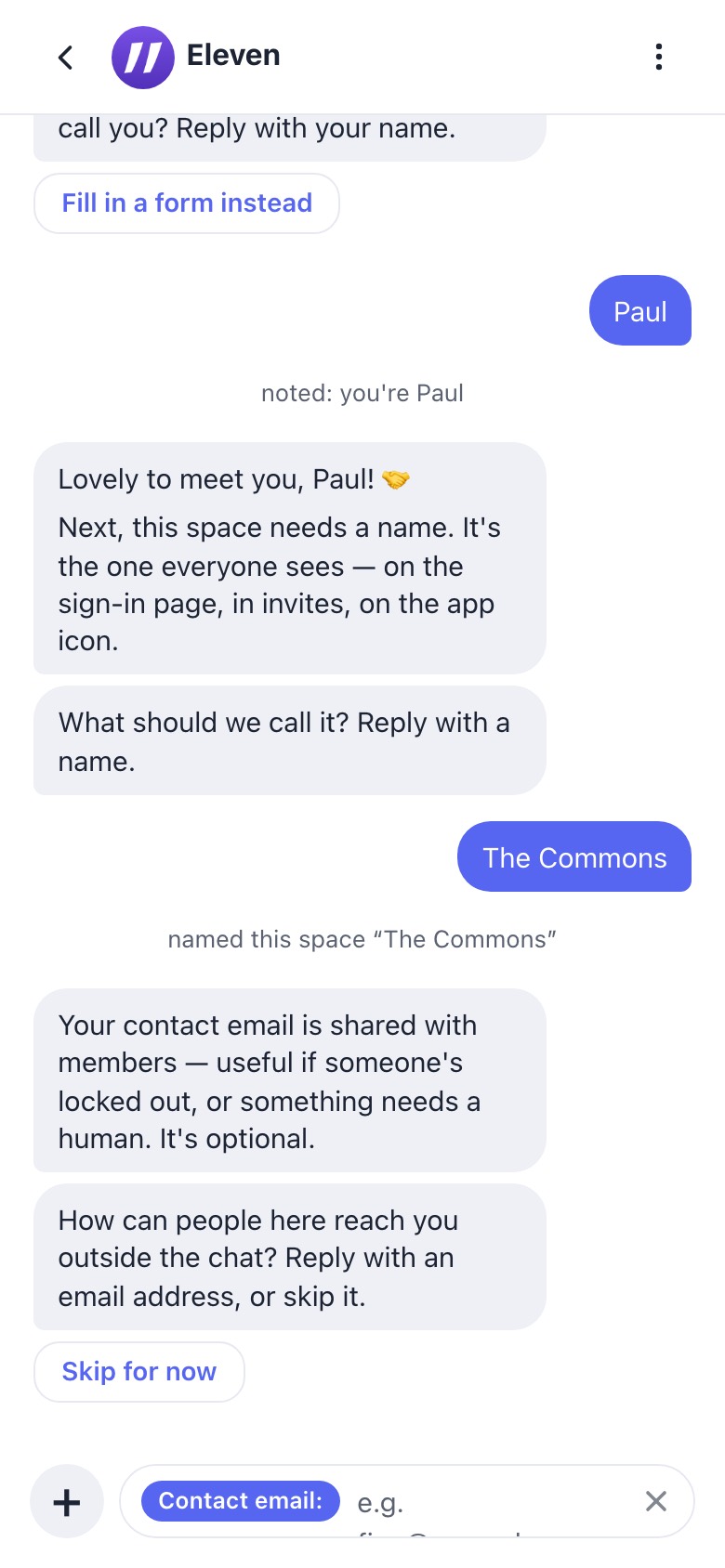
Email
5.7screenshotemail

Contact email

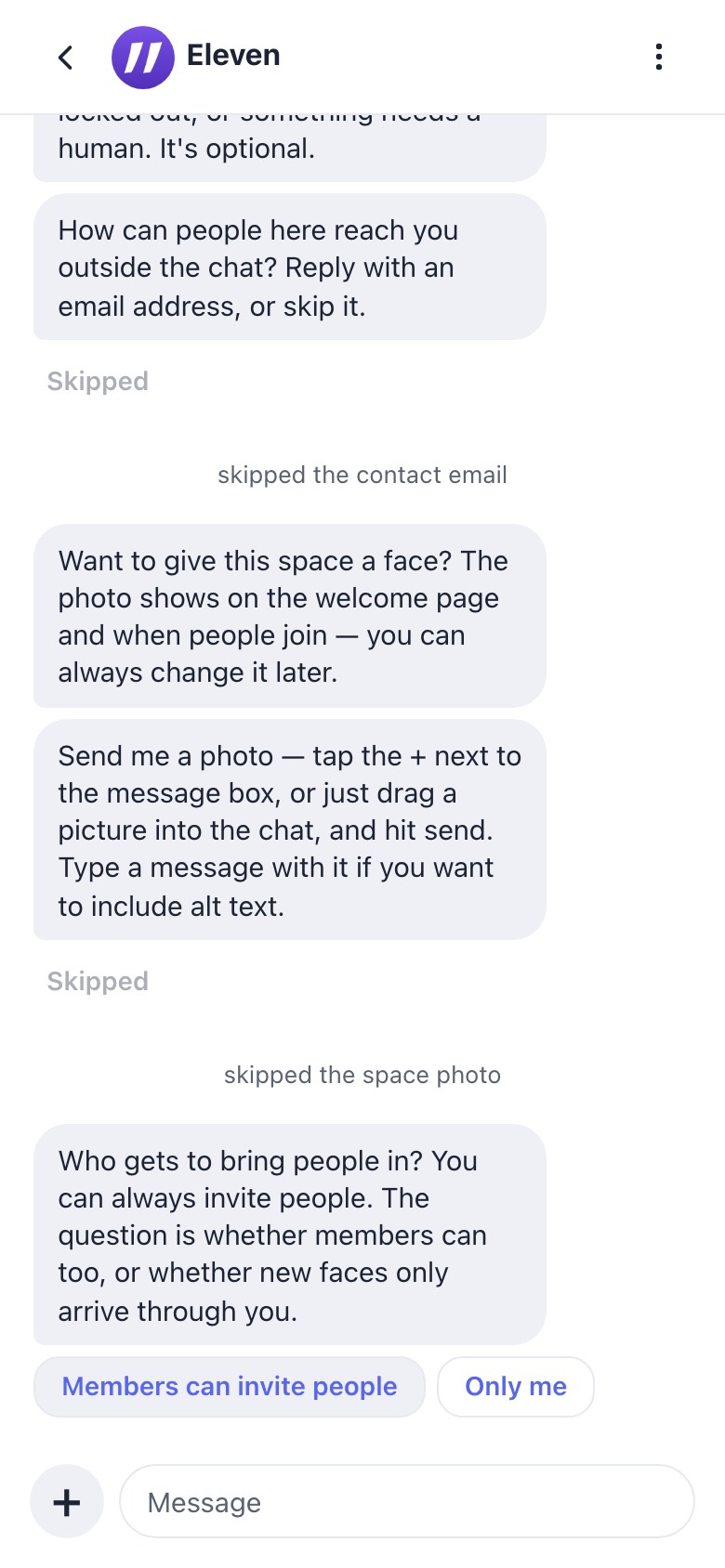
Your contact email is shared with members — useful if someone's locked out, or something needs a human. It's optional.

How can people here reach you outside the chat? Reply with an email address, or skip it.

Skip for now

setup.flow.js:139-165

cnz.11ch.at
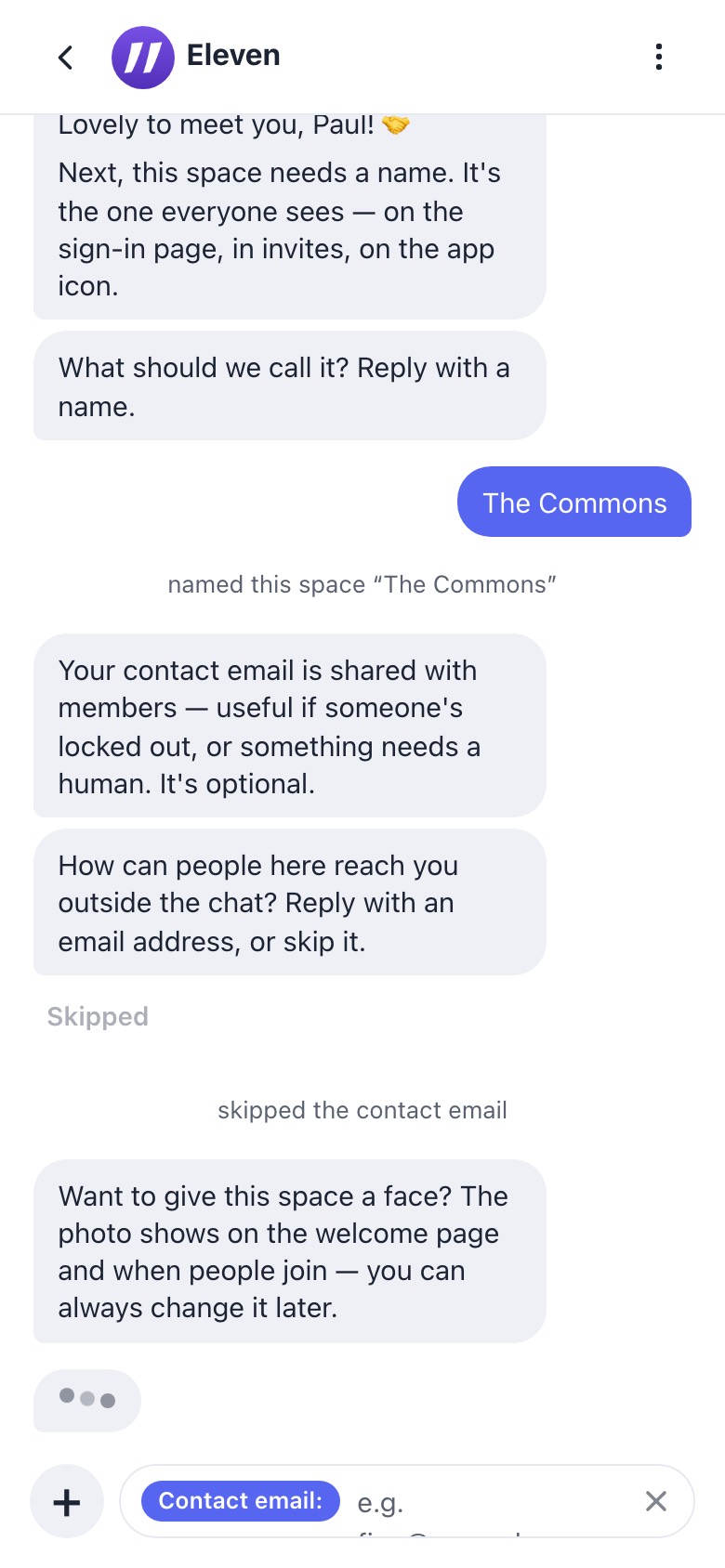
Space photo
5.8screenshotphoto (web only)

Space photo

Want to give this space a face? The photo shows on the welcome page and when people join — you can always change it later.

Send me a photo — tap the + next to the message box, or just drag a picture into the chat, and hit send. Type a message with it if you want to include alt text.

Skip for now

The preview warns that the alt text is PUBLIC (“anyone with an invite link can see both”).

setup.flow.js:166-230

cnz.11ch.at
Invites
5.9screenshotinvites

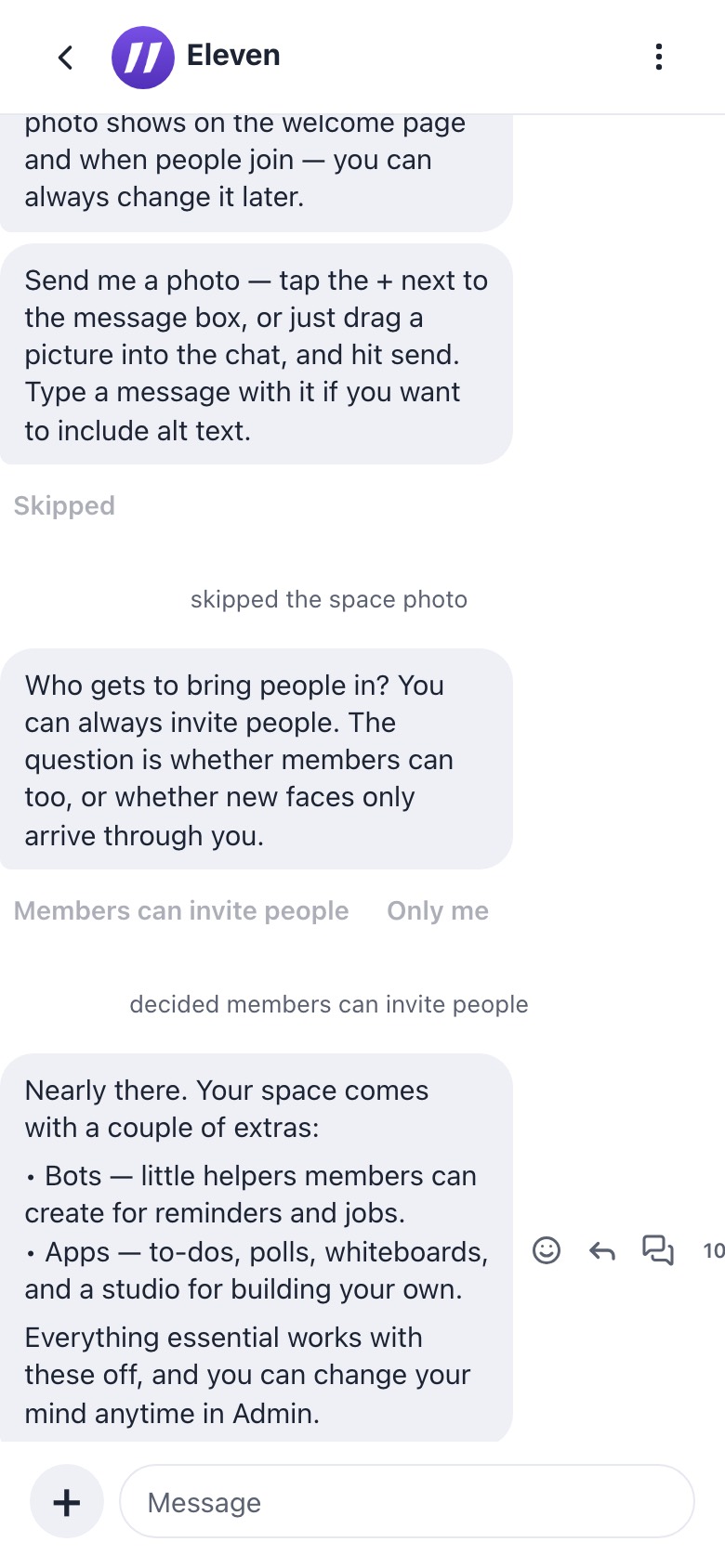
Who can invite

Who gets to bring people in? You can always invite people. The question is whether members can too, or whether new faces only arrive through you.

Members can invite peopleOnly me

setup.flow.js:231-255

cnz.11ch.at
Extras
5.10screenshotextras

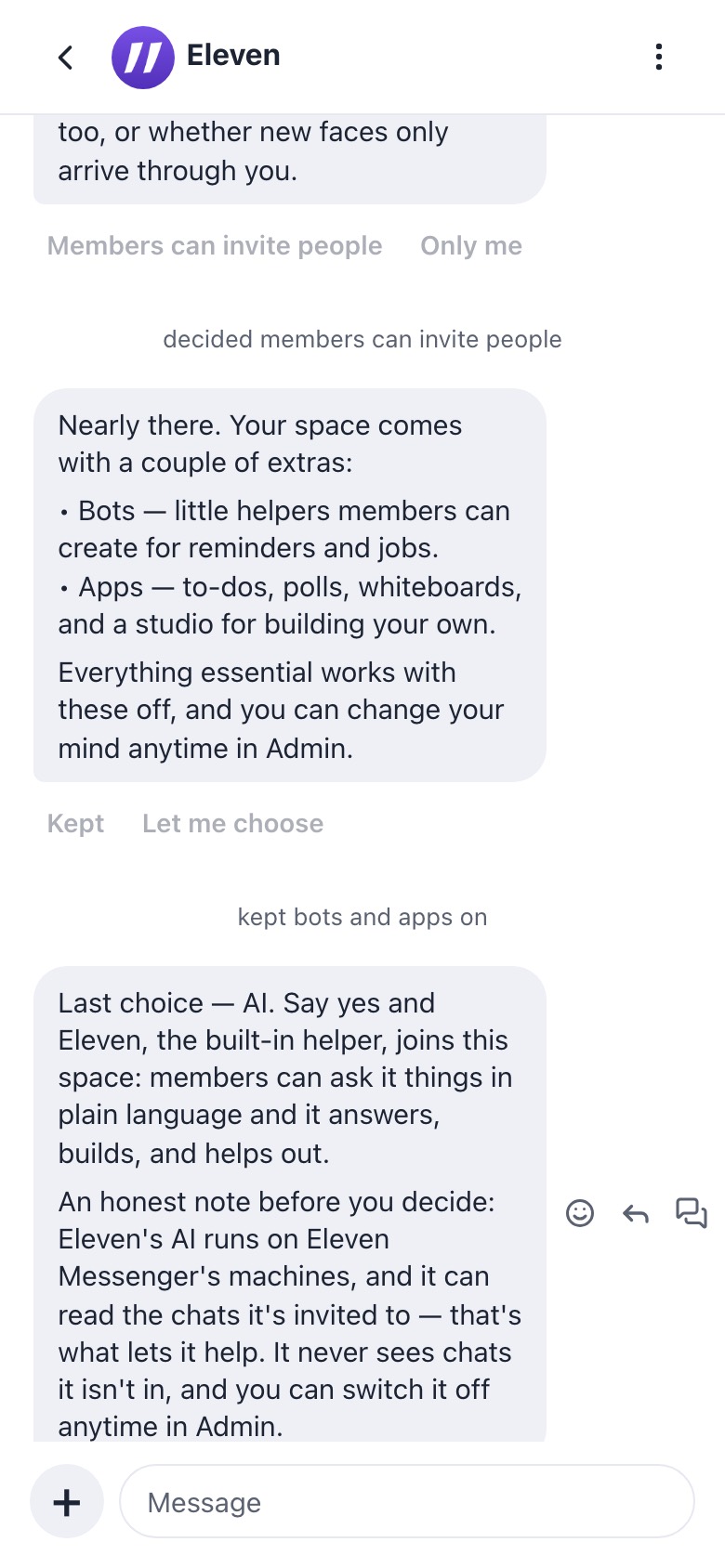
Extras: bots + apps

Nearly there. Your space comes with a couple of extras:

• Bots — little helpers members can create for reminders and jobs.
• Apps — to-dos, polls, whiteboards, and a studio for building your own.

Everything essential works with these off, and you can change your mind anytime in Admin.

Keep both onLet me choose

“Let me choose” asks two more questions: “Enable bots / No bots here”, then “Enable apps / No apps here”.

setup.flow.js:261-335

cnz.11ch.at
AI opt-in
5.11screenshotai-optin

AI opt-in

Last choice — AI. Say yes and Eleven, the built-in helper, joins this space: members can ask it things in plain language and it answers, builds, and helps out.

An honest note before you decide: Eleven's AI runs on Eleven Messenger's machines, and it can read the chats it's invited to — that's what lets it help. It never sees chats it isn't in, and you can switch it off anytime in Admin.

Bring Eleven inNot now

setup.flow.js:341-370

cnz.11ch.at
MOCK
One more question — who is this space for?

Every space starts free, and free is a real home — kept that way by the spaces that pay. If this one's for a team, a community, or family, there's a plan that backs it (and the free spaces too).
A teamA communityFamily & friendsKeep it free
For a team that's Business: … A paid space never counts against your space limit, is never reclaimed as unused, and carries a bigger storage allowance.
Choose BusinessKeep it free
5.12mockplan (web, free space, price book)

Plan: built, mid-flow

Not captured, because the local home had no price book. Choosing a plan records “chose the {plan} plan — payment waits at the finish line”. Skipped natively without being recorded.

setup.flow.js:368-470 · apps/setup.js:139-158

cnz.11ch.at
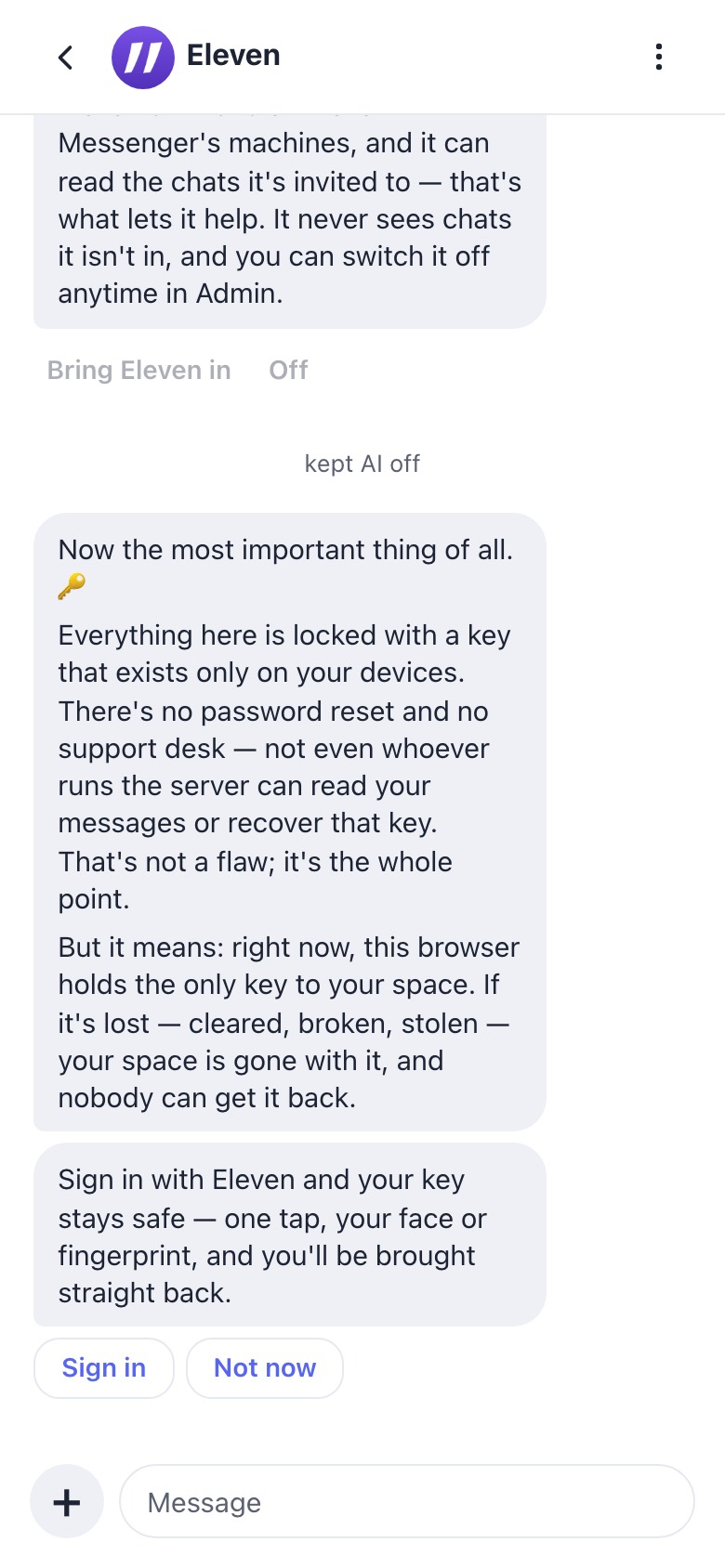
Keys
5.13screenshotkeys

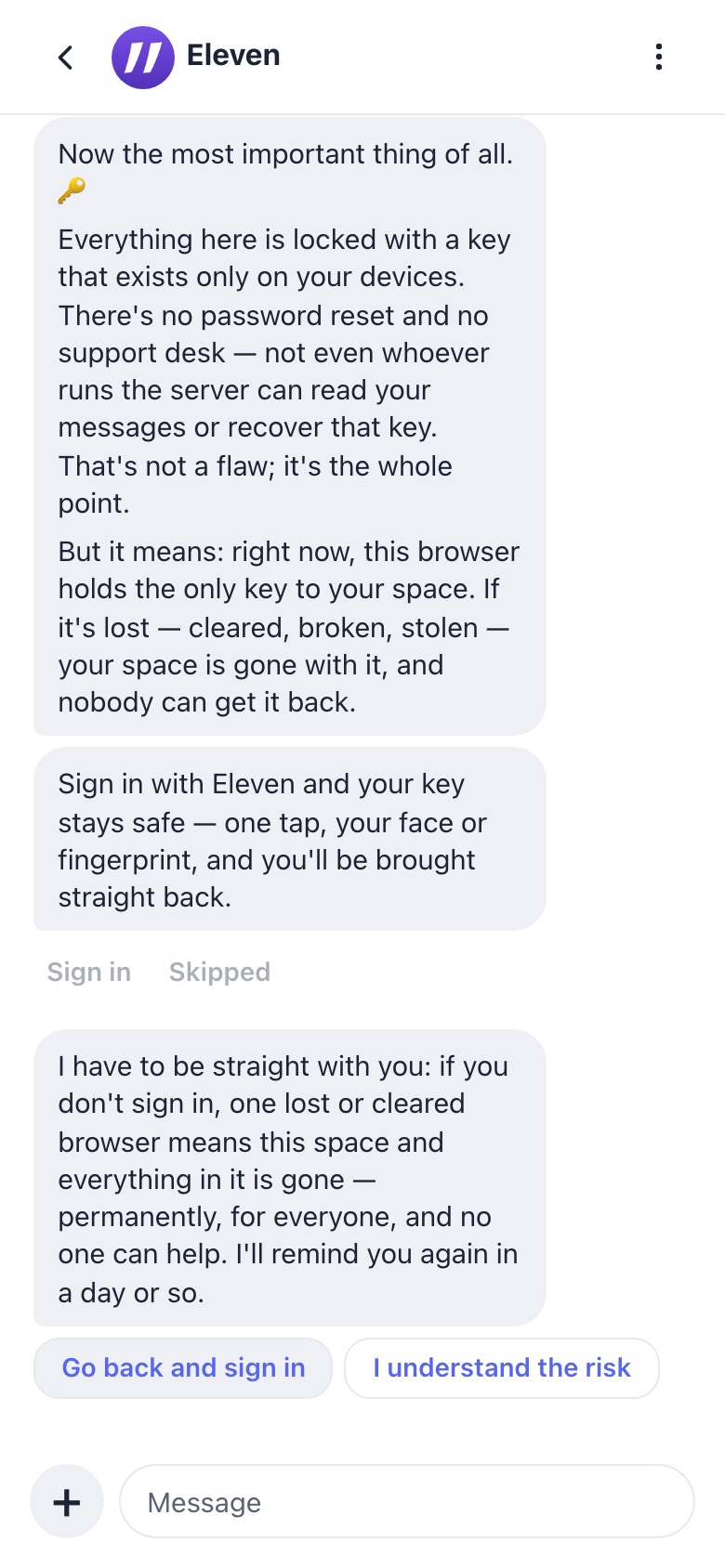
The key (“the most important thing”)

Now the most important thing of all. 🔑

Everything here is locked with a key that exists only on your devices. There's no password reset and no support desk — not even whoever runs the server can read your messages or recover that key. That's not a flaw; it's the whole point.

But it means: right now, this browser holds the only key to your space. If it's lost — cleared, broken, stolen — your space is gone with it, and nobody can get it back.

Sign in with Eleven and your key stays safe — one tap, your face or fingerprint, and you'll be brought straight back.

Sign inNot now

From home (?src=home) this becomes keys-home: “Last thing — the key. 🔑 This space is locked with a key that was just created here, in this browser. Your Eleven sign-in doesn't hold it yet…”. Natively and signed in, it’s recorded automatically.

setup.flow.js:471-585

cnz.11ch.at
Keys confirm
5.14screenshotkeys-confirm

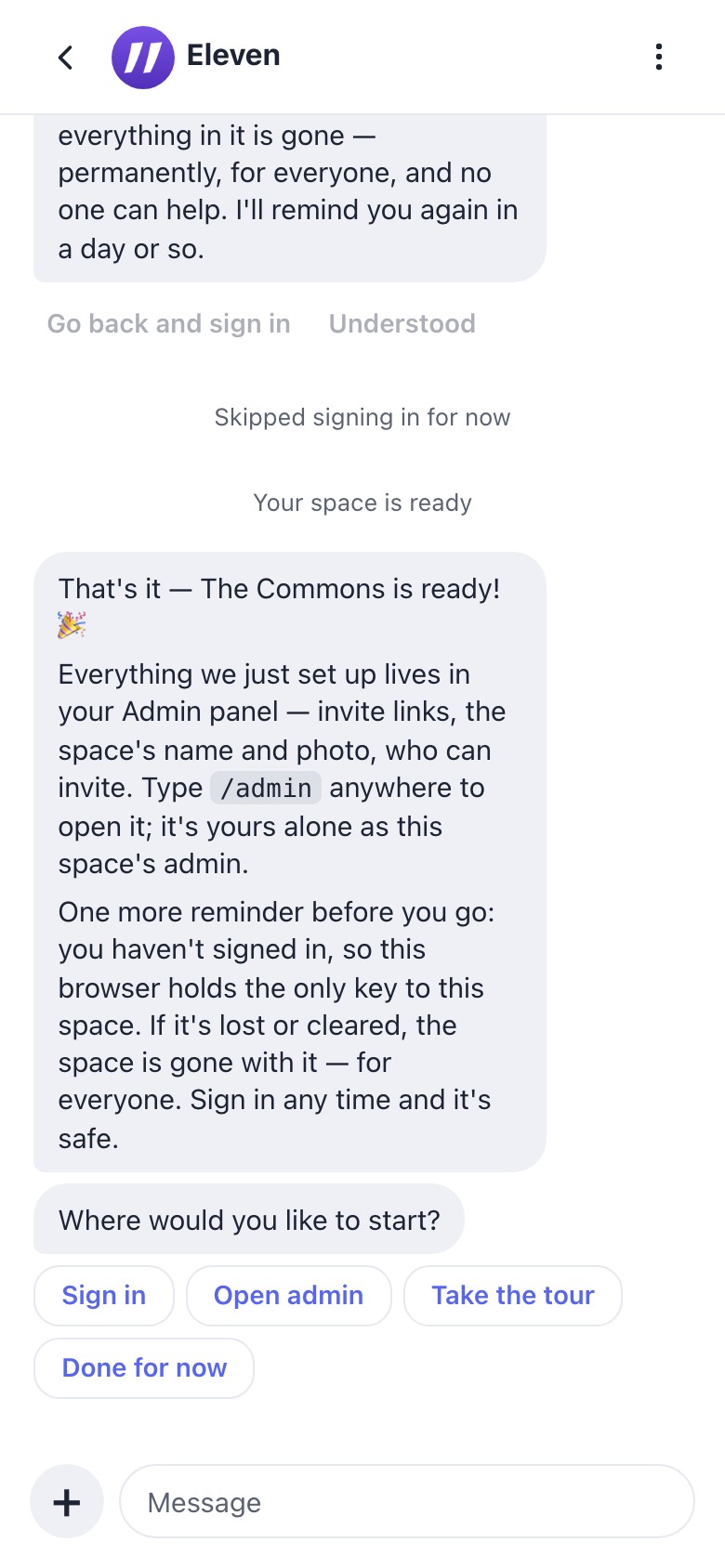
“Not now” → are you sure

I have to be straight with you: if you don't sign in, one lost or cleared browser means this space and everything in it is gone — permanently, for everyone, and no one can help. I'll remind you again in a day or so.

Go back and sign inI understand the risk

setup.flow.js:616-640

cnz.11ch.at
Finish
5.15screenshotfinish

Finish

That's it — The Commons is ready! 🎉

Everything we just set up lives in your Admin panel — invite links, the space's name and photo, who can invite. Type /admin anywhere to open it; it's yours alone as this space's admin.

(not signed in) One more reminder before you go: … this browser holds the only key to this space…

(plan picked) And the plan you picked — tap below whenever you're ready to set up the payment. Your space runs free until then.

Where would you like to start?

Sign inSet up your planOpen adminTake the tourDone for now

setup.flow.js:642-698 · apps/setup.js:189-201 · full transcript

Planned (Paul): always create free, then a plans step at the end of setup
home.elevenmessenger.com
PLANNED
Slide to create

Your new space will be created immediately.

5.P1planned

No bounce at create

Over-quota or pool-full creates go through as “pending plan” rather than refusing. Open question: how to cap free spaces without a refusal, perhaps with a grace period before the reaper.

cnz.11ch.at
PLANNED
…the key step, done first…
Name, space name, invites, extras, AI…
5.P2planned

Key first, questions after

Suggestion: move the key step up, since the copy calls it “the most important thing of all”.

cnz.11ch.at
PLANNED
Last thing — who is this space for?
A teamA communityFamily & friendsKeep it free
→ checkout inline, then “That's it — The Commons is ready! 🎉”
5.P3planned

Plans as the final step (web + native)

Reuses today’s plan step. It would move after the key step, add a native version, and replace the over-quota bounce. A plan picked here should pre-fill home’s upgrade picker so the choice isn’t made twice.

Native create (iPhone “+” / Mac “Create a space”)
MOCK
Slide to create

Your new space will be created immediately.

Cancel
5.Nmock

CreateSpaceView

Same copy as web. The slider’s VoiceOver label is “Volume slider — slide to eleven to create your space”. There is no paid branch: a refusal is shown inline (“…upgrade…”) with no way to upgrade. The space is claimed with setup_complete: true, so web never resumes setup.

CreateSpaceView.swift · SpaceCreate.swift:62-64, 307-309

6 · New device / returning member

On a fresh browser, the home page is the front door. A space visited while signed out redirects there too (shell.js:8874-8876), except in a standalone PWA or with ?stay=1.

Built today
home.elevenmessenger.com
Home signed out
6.1screenshot

Home, signed out

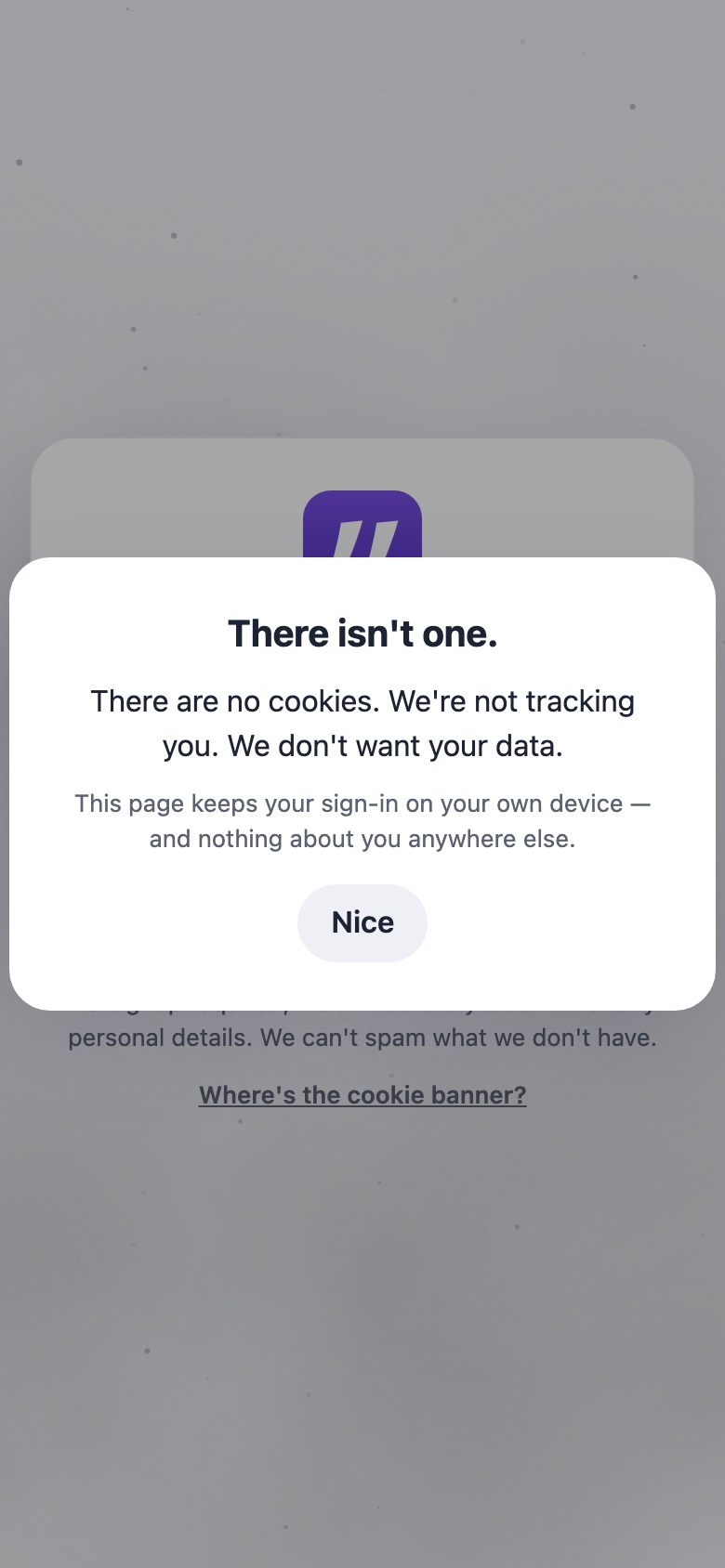
The same doors as the join card, with the Eleven lockup instead of a join heading and no “…” menu. Browsers that have never signed in also get the demo card. The loading tagline is “The group chat of dreams”. Mac-UA variant · cookie dialog (“There isn't one.”).

home/web/pages/index.html:823, 1291-1315

home.elevenmessenger.com
MOCK
Your Eleven spaces⋮
Unlock your spaces with your passkey
6.3mock

Sealed: provider sign-in on a new browser

The only control is the button below. If no passkey is available, the person sees “Sign in was cancelled. If you didn't cancel, try again. (NotAllowedError)”, and the explainer is attached to a hidden element. Dead end.

Unlock your spaces with your passkey

index.html:1004-1006 · home.js:1153-1164, 1019-1023, 4381

home.elevenmessenger.com
MOCK
Your Eleven spaces+ ⋮
Search spaces
The Commonsthecommons.11ch.at

None (yet). Creating is invite-only for now. (when empty)

6.2mock

Unlocked: your list

The account menu has “Sign-in options” and “Sign out”. If the account is empty and you signed in with a provider: “Already have spaces? Sign in with your passkey to bring them over.”

index.html:985 · home.js:2830-2841, 3024-3032

home.elevenmessenger.com/restore
MOCK
Signing in…

Your face or fingerprint is the key. Not even this server can see inside your spaces.

Unlocked. Taking you back to your chat…

6.5mock

Open a saved space → restore

Tapping a row opens <space>/?restore=1, then /restore, then #lchat_restore. A failed unwrap bounces silently back to home.

Errors: Nothing saved for this sign-in yet. / That sign-in can't unlock these spaces. / Your Eleven account doesn't include {host}. Open the chat from an invite instead.

restore.html · restore.js · serverlist.js:16-24 · shell.js:973-977, 8865-8876

In flight: device-held key (#1557) + approve from another device (#1559, stacked on #1557)
home.elevenmessenger.com
#1557
Your Eleven spaces
The Commonsopens straight away
6.Ain flight #1557

Sign in → lands unlocked

A passkey becomes optional. Each browser holds a non-extractable device key that the vault key is wrapped to. A provider sign-in on a browser that holds a wrap lands unlocked.

Nudge: Only this browser can open your saved spaces. Add another way to unlock them, so losing it never locks you out.

Your devices: Signing in proves it’s you. These devices hold the key that opens your saved spaces.

PR #1557 (vault-device-key)

home.elevenmessenger.com (new browser)
#1559

Your spaces are saved, but this browser can’t open them yet. Approve it from a device you already use, or unlock with another way you’ve set up — once, and it’ll remember.

Approve from a device you already useUnlock your spaces with your passkey
6.Bin flight #1559

Sealed → approve

On a device where your spaces already open, go to the Eleven home page. It will ask to approve this browser.

Check the code matches on both screens.

The codes matchCancel

approve-from-device: index.html:1032-1033 · home.js:1902-1910

home.elevenmessenger.com (old device)
#1559
A browser is asking to open your spaces

Only approve it if you’re signing in there right now.

ReviewNot me
6.Cin flight #1559

Approving device

Approve {label}? — Check the code matches on both screens.

{label} can open your spaces now.

ApproveDon’t approve

approve-from-device: home.js:2054-2063

home.elevenmessenger.com (new browser)
#1559

Approved — this browser can open your spaces now.

6.Din flight

Approved

Also reachable from the join key step (1.6u+). Native parity: not yet. The Mac’s “Link from Your iPhone…” is the closest equivalent today.

7 · Add-a-device link / QR, and admin cards

Add a device (existing member → new device)
thecommons.11ch.at
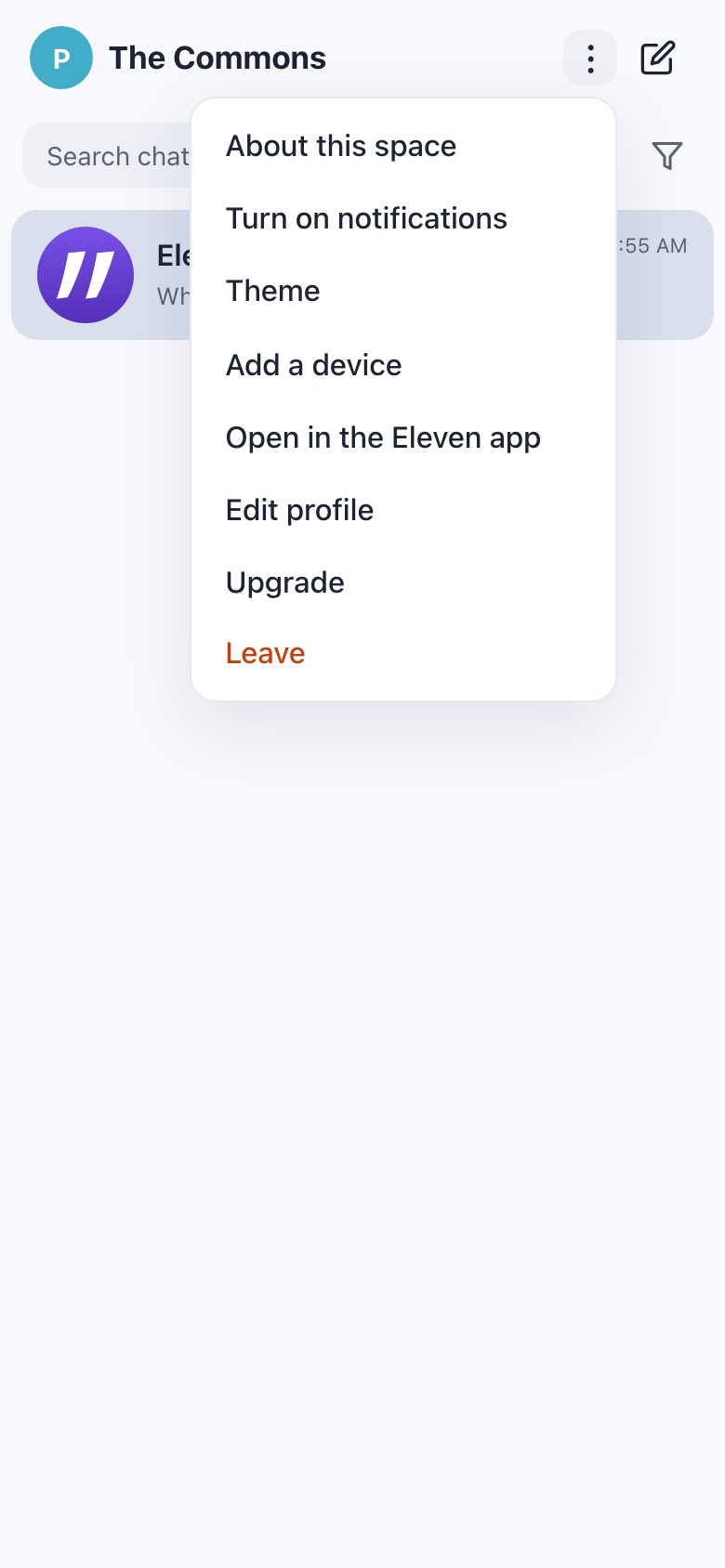
Space menu
7.1screenshot

⋮ → Add a device

Also available from the command palette. On a Mac browser, “Open in the Eleven app” appears too.

web/pages/index.html:150-160 · shell.js:2678

thecommons.11ch.at
Add a device sheet with QR
7.2screenshot

Add a device sheet

Add a device

Open this on another device to sign in there — or save it somewhere safe (like a password manager): it's a way back in if you lose this device. It works once, and anyone who uses it signs in as you.

Copy linkSign in with ElevenDone

At 390px wide the button row overflows and “Done” is clipped. Failure uses alert("Couldn't create a device link. Try again.").

web/static/adddevice.js:32-95

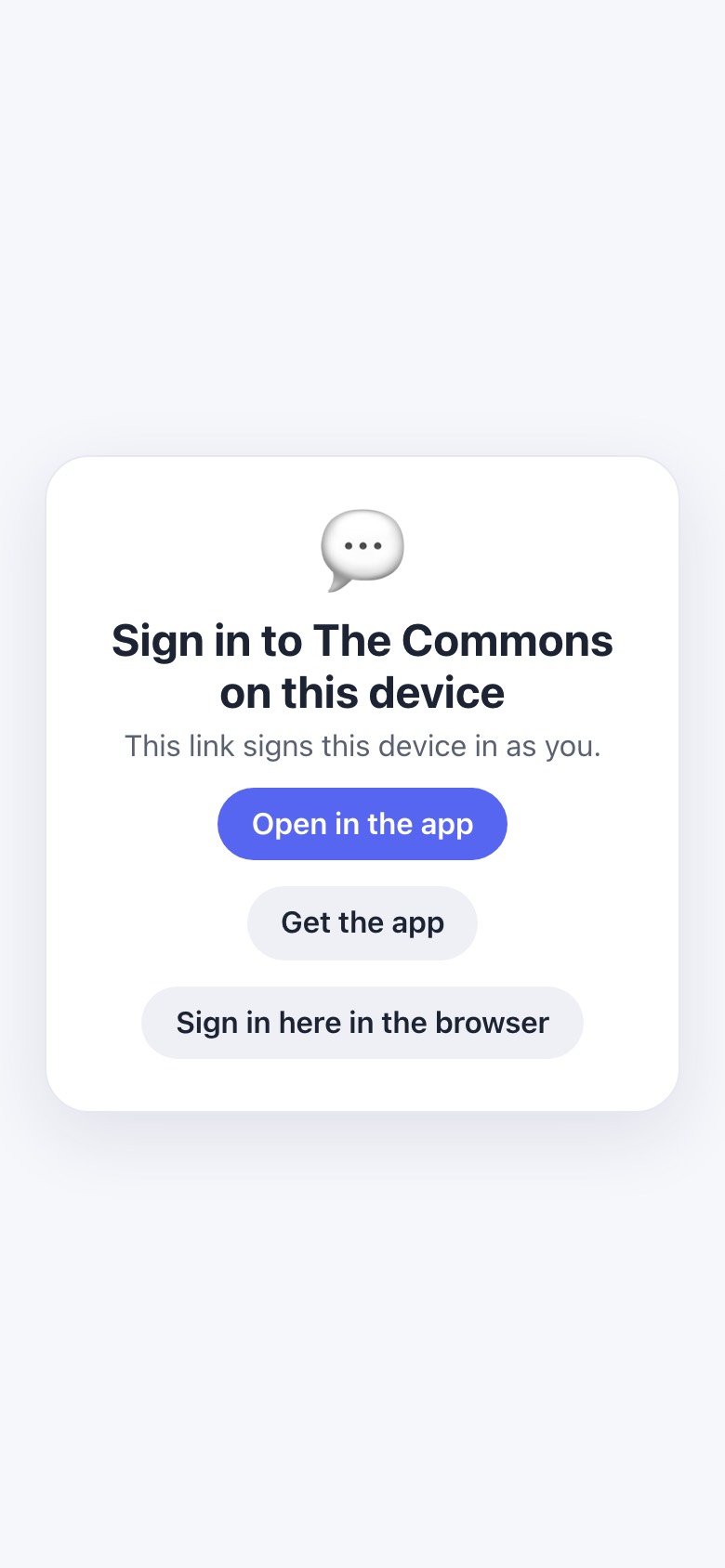
thecommons.11ch.at/join/join#e1.…~Paul
Sign in to The Commons on this device
7.3screenshot

New device opens the link

Never sign-in-first: a device link carries the private key.

Sign in to The Commons on this device

This link signs this device in as you.

Open in the appGet the appSign in here in the browser

join.js:405-410 · prejoin.js:33

thecommons.11ch.at
MOCK
Handing over to the Eleven app

The app opens with a one-time sign-in for this space — confirm it there and you're in as you. Nothing happened? You need the Eleven app (or its latest update); or copy the link below and paste it into the app's Add from link.

Copy the sign-in linkDone
7.4mock

Mac browser: Open in the Eleven app

adddevice.js:111-151

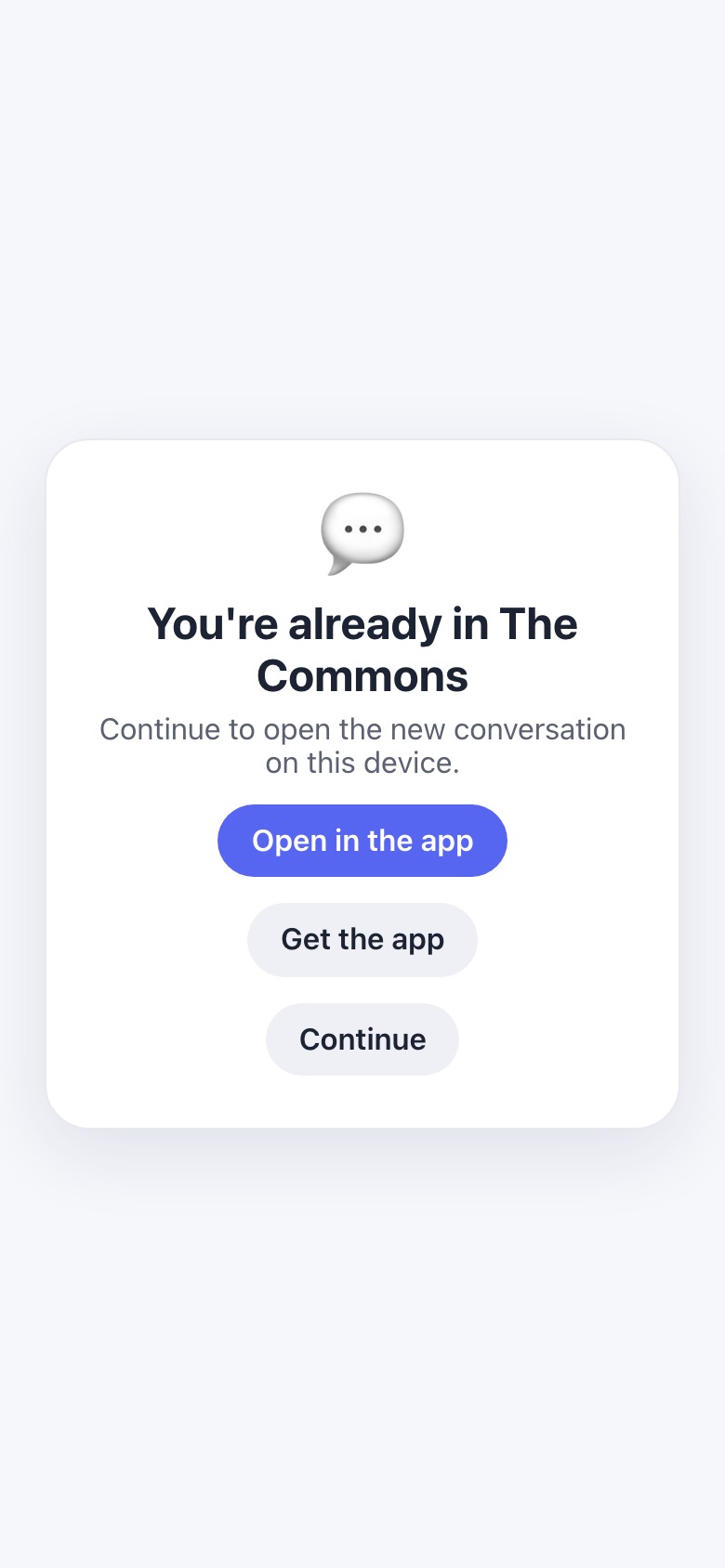
An existing member opens another invite, or an admin invite
thecommons.11ch.at/join/join#e1.…
You're already in The Commons
7.5screenshot

Adopt: already a member

You're already in The Commons

Continue to open the new conversation on this device.

Open in the appGet the appContinue

join.js:411-417

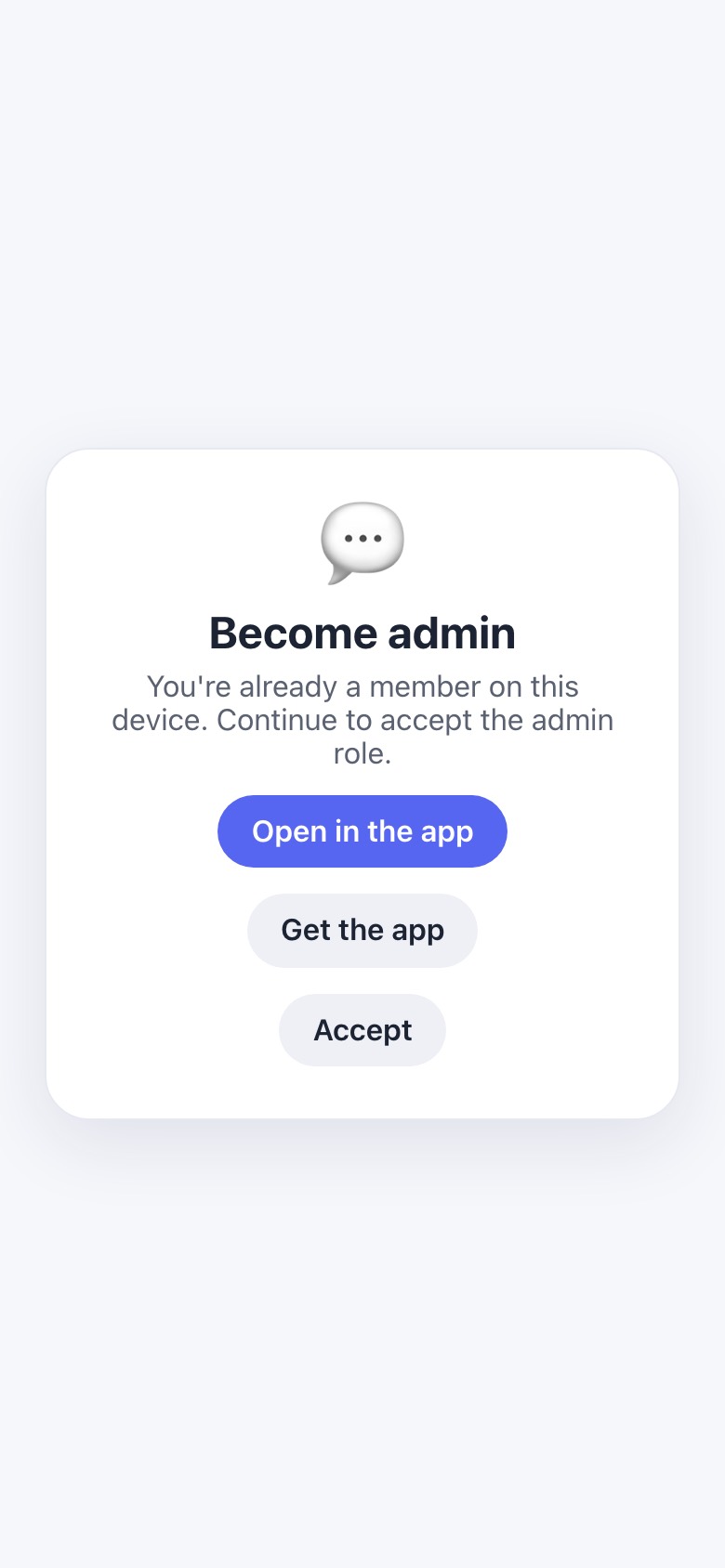
thecommons.11ch.at/join/join#e1.…
Become admin
7.6screenshot

Become admin

Become admin

You're already a member on this device. Continue to accept the admin role.

Open in the appGet the appAccept

A new person opening an admin invite sees the plain “Join <name>” card, which never mentions admin.

join.js:418-423

thecommons.11ch.at/admin
MOCK
Create admin invite

⚠️ This is powerful

Anyone who claims this link becomes an admin with full control over this server.

Treat this link like a password — keep it private.

CancelCreate invite
7.7mock

Admin console: delegate admin

Delegate admin role — Create an invite that makes the claimer an admin. They can then access this console with their device token (no need to share your admin link)…

web/pages/admin.html:213-217 · admin.js:509-531 · apps/admin.js:1535-1570

What this review couldn’t determine

  • The real provider ceremonies (Apple, Google, Microsoft, GitHub, email delivery) and the WebAuthn key step. The local home had fake doors enabled, so those screens are mocks. A sign-in-first path through a completed sign-in wasn’t captured.
  • Production state: whether the free pool is currently “red”, which would gate every free create in practice, and the live price book. Prices shown are from docs/tier-economics.md.
  • The setup plan step on screen. It needs a home price book, which the local run didn’t have.
  • iPhone screens past first run. Opening a link raises a system “Open in Eleven?” prompt that needs a tap, and driving the simulator by hand was out of scope. The iOS < 18 wall can’t be shown on an iOS 26 simulator.
  • The Mac app wasn’t launched: a dev build shares the real keychain group. All Mac cards are mocks from source.
  • Android: no native onboarding is on main (#1536 is an open preview PR).

🤖 Generated 2026-10-03 for review. Screenshots: local throwaway lchat + home builds of 7312ce3a (headless Chromium at 390×844 @2x, an iPhone Safari user agent for the joiner and a desktop user agent for the creator) and one iOS 26.5 simulator capture. Back to top ↑